MyITCyberBack to home
// insights · field notes

Notes on infrastructure and security

Short notes from the MyIT Cyber team on the systems we build, secure, and run every day. Written for IT leaders and decision makers, with no marketing fluff.
29 articles
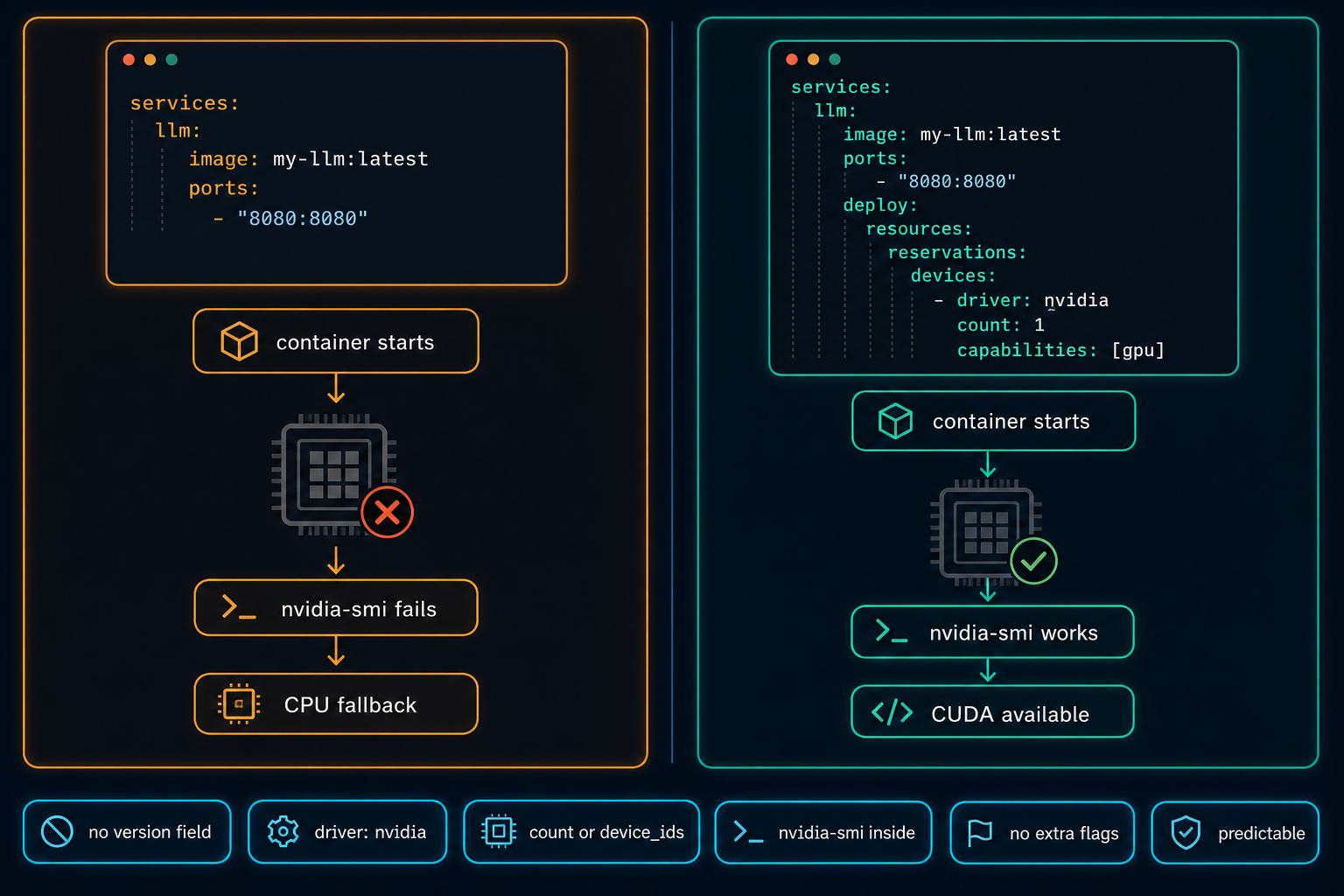
Docker Compose GPU access configuration. Left panel shows a compose file without the deploy.resources block, with a flow showing container start, GPU chip with red X, nvidia-smi failing, and workload falling to CPU. Right panel shows a compose file with the deploy.resources.reservations.devices block including driver: nvidia and count: 1, with a flow showing container start, GPU chip with green checkmark, nvidia-smi working, and CUDA available. Bottom strip shows six checks: compose file defines GPU, driver: nvidia, count or device_ids, nvidia-smi from inside, no extra flags, predictable behavior.
AI Infrastructure·

Docker Compose Does Not Automatically Use the GPU

On Linux GPU servers, Docker Compose does not use the NVIDIA GPU automatically. The service starts, nothing obviously fails, and the workload quietly falls back to CPU. The fix is a few lines in the compose file, but only if you know to look for them.
2 min readRead article
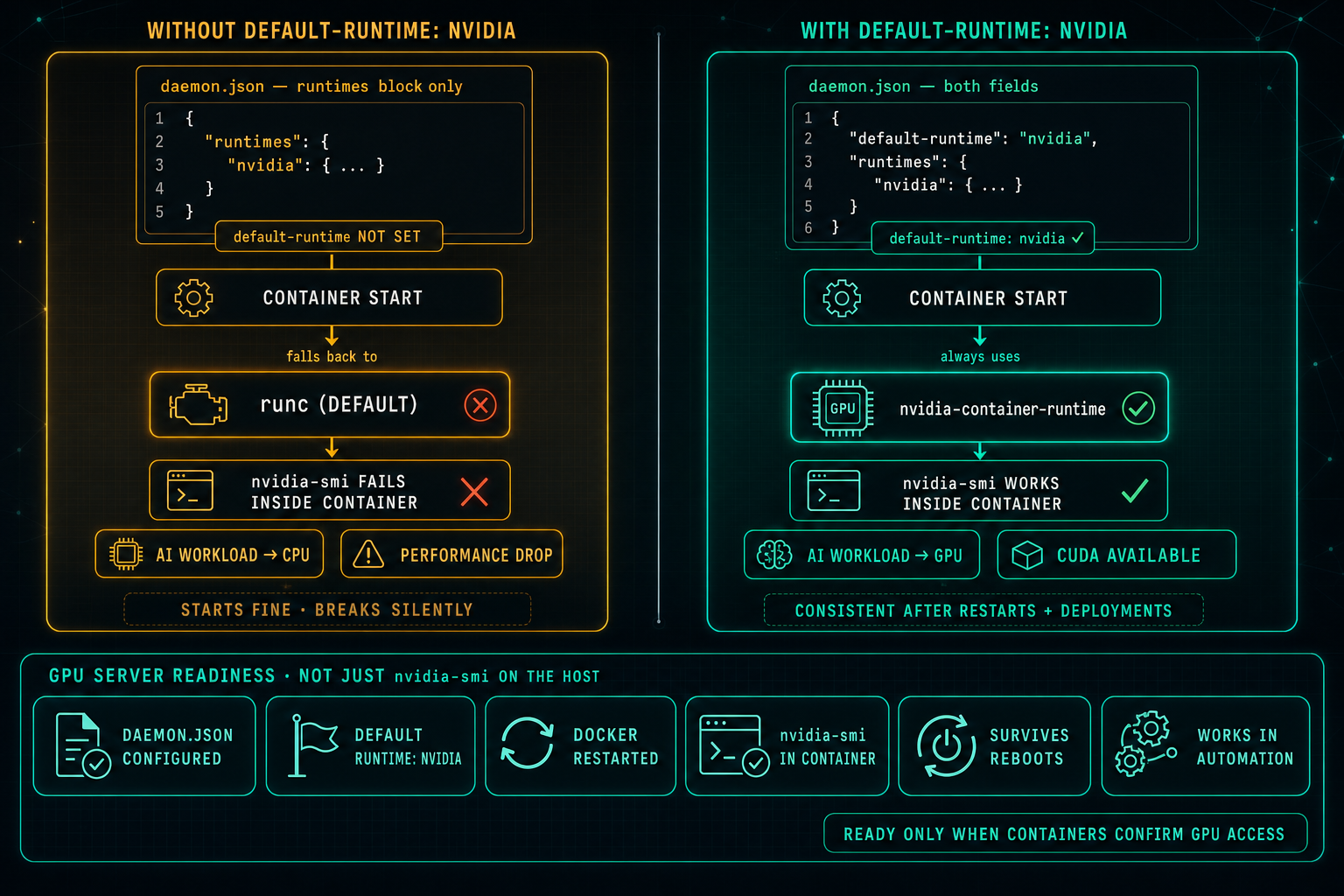
Docker default runtime configuration for NVIDIA GPU containers. Left panel shows daemon.json with only the runtimes block and no default-runtime set, with a flow showing container start falling back to runc, nvidia-smi failing inside the container, and AI workloads dropping to CPU. Right panel shows daemon.json with both default-runtime: nvidia and the runtimes block, with a flow showing the container always using nvidia-container-runtime, nvidia-smi working inside the container, CUDA available, and consistent behavior after restarts and deployments. Below, a GPU server readiness strip with six checks: daemon.json configured, default runtime nvidia, Docker restarted, nvidia-smi in container, survives reboots, works in automation.
AI Infrastructure·

Docker Default Runtime: Keep GPU Containers on NVIDIA

On Linux GPU servers, Docker can know about the NVIDIA runtime and still not use it. If default-runtime is missing from daemon.json, every container falls back to runc, nvidia-smi fails inside the container, AI workloads drop to CPU, and the problem looks like an application issue when it is really a one-line configuration gap.
2 min readRead article
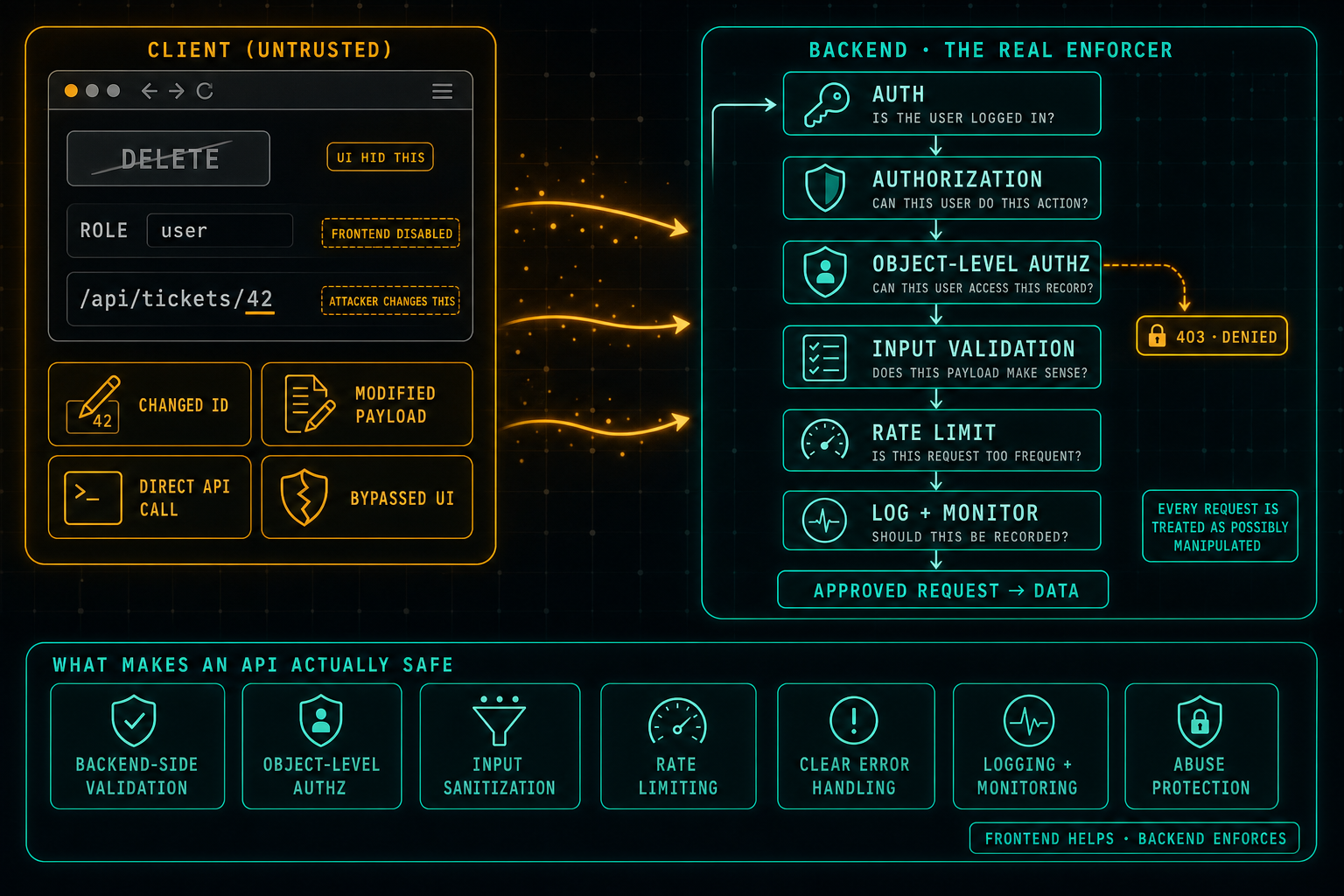
API security with backend validation diagram. On the left, an untrusted client panel showing a browser UI with a hidden DELETE button, a disabled ROLE field, and the URL /api/tickets/42 with the 42 underlined as 'attacker changes this', plus four amber pills indicating client-side manipulation: changed ID, modified payload, direct API call, bypassed UI. Amber arrows representing manipulated requests flow into the right panel, a backend pipeline labeled THE REAL ENFORCER. The pipeline runs each request through six teal gates top to bottom: AUTH (is the user logged in?), AUTHORIZATION (can this user do this action?), OBJECT-LEVEL AUTHZ (can this user access this record?), INPUT VALIDATION (does this payload make sense?), RATE LIMIT (is this request too frequent?), LOG + MONITOR (should this be recorded?), exiting into an APPROVED REQUEST arrow, with a side branch from OBJECT-LEVEL AUTHZ to an amber 403 · DENIED pill, and a callout noting every request is treated as possibly manipulated. Below, a strip of seven equally weighted controls: backend-side validation, object-level authorization, input sanitization, rate limiting, clear error handling, logging plus monitoring, and abuse protection, with a small tag reading 'frontend helps · backend enforces'.
Infrastructure Security·

API Security: Do Not Trust the Client

The frontend can hide buttons, disable fields, and guide the user through the right flow, but anything that comes from the client can be changed. Attackers swap IDs in URLs, edit payloads, call the API directly, and bypass the UI completely. Real security lives in the backend: authentication, authorization, object-level access checks, input validation, rate limits, and logging on every request, because every request is treated as possibly manipulated.
2 min readRead article
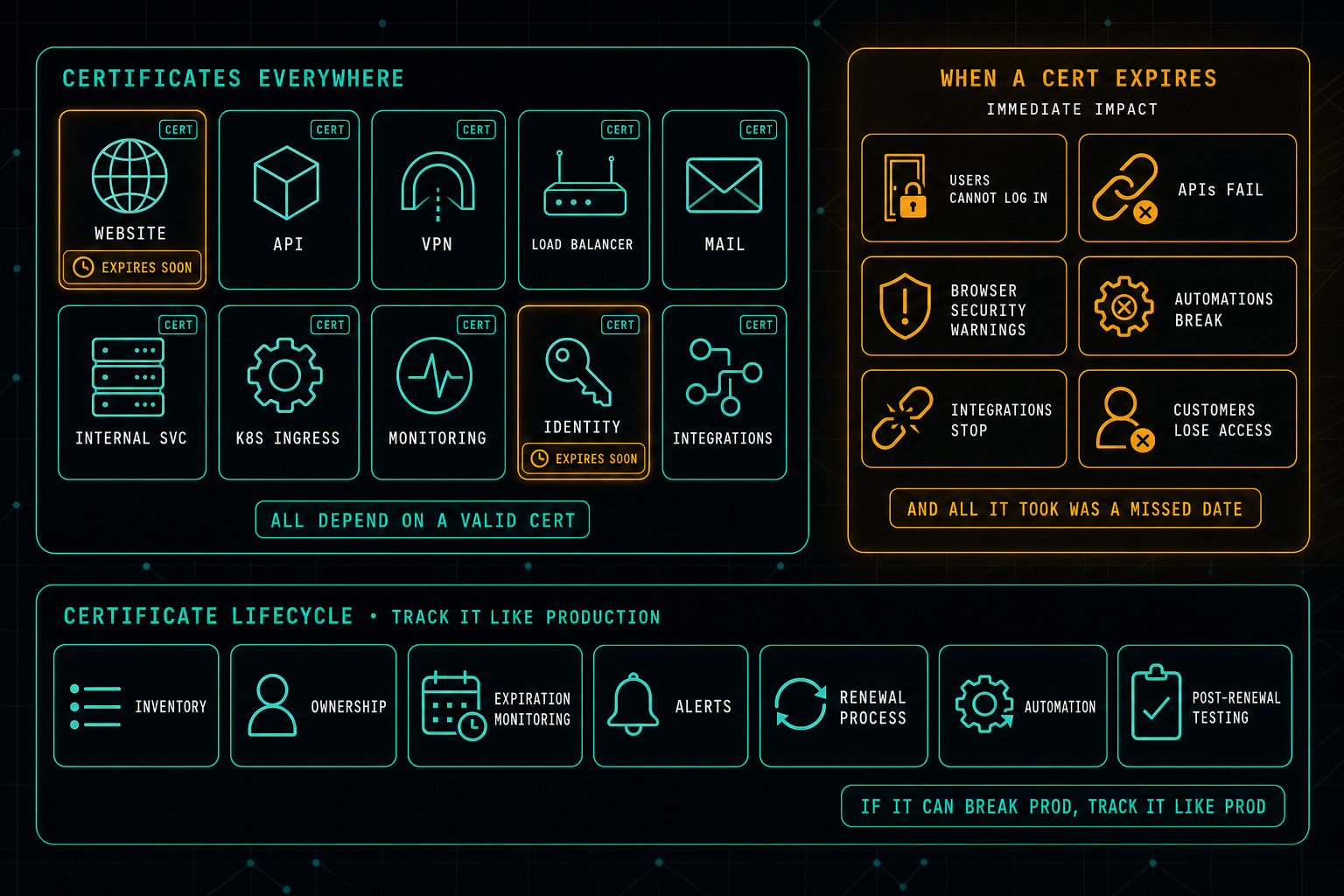
Certificate expiration risk diagram. On the left, a CERTIFICATES EVERYWHERE panel showing ten services that quietly depend on a valid certificate, website, API, VPN, load balancer, mail, internal services, Kubernetes ingress, monitoring, identity, and integrations, with two services (WEBSITE and IDENTITY) flagged in amber as EXPIRES SOON, and a footer pill reading 'all depend on a valid cert'. On the right, an amber-bordered WHEN A CERT EXPIRES panel listing the immediate impact: users cannot log in, APIs fail, browser security warnings appear, automations break, integrations stop, customers lose access, with a footer note 'and all it took was a missed date'. Below, a CERTIFICATE LIFECYCLE strip with seven equally weighted controls: inventory, ownership, expiration monitoring, alerts, renewal process, automation, and post-renewal testing.
Infrastructure Security·

Certificate Expiration Is Still Taking Systems Down

An expired certificate is one of the simplest, most preventable outages, and it still keeps happening. The fix is not heroics on renewal day. It is treating certificates like production assets: a real inventory, a clear owner, monitored expirations, alerts, a renewal process, automation where possible, and post-renewal testing so the change does not break something downstream.
2 min readRead article
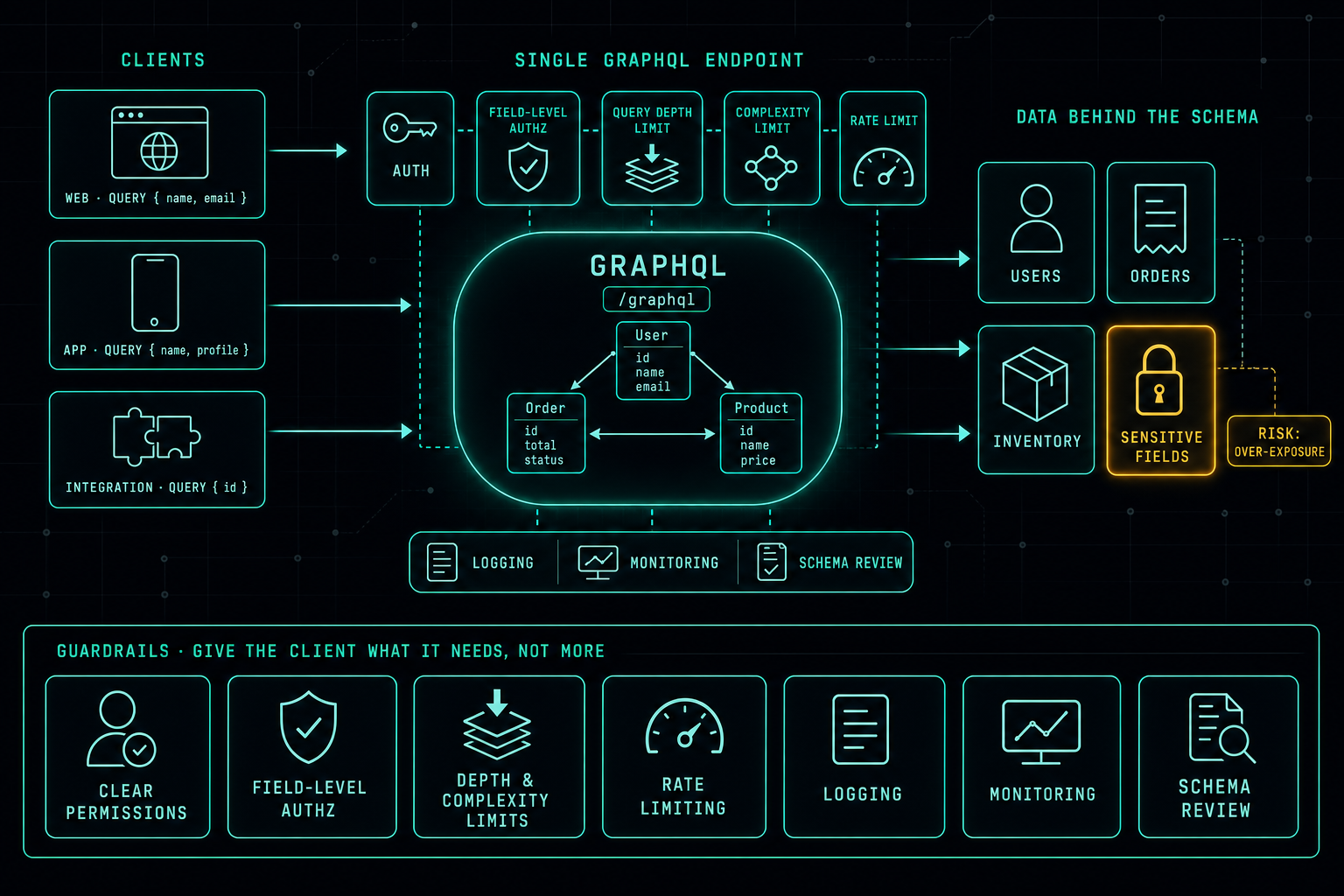
GraphQL API security diagram. On the left, three clients (web, mobile, integration) each sending a differently shaped query. In the center, a single GraphQL endpoint with an inner schema view of User, Order, and Product types, ringed above by a chain of five security gates, AUTH, FIELD-LEVEL AUTHZ, QUERY DEPTH LIMIT, COMPLEXITY LIMIT, RATE LIMIT, and below by three operational pills: LOGGING · MONITORING · SCHEMA REVIEW. On the right, the data behind the schema as four cards: USERS, ORDERS, INVENTORY, and a SENSITIVE FIELDS card glowing amber with a connected RISK: OVER-EXPOSURE callout. Below, a GUARDRAILS strip listing seven equally weighted controls: clear permissions, field-level authorization, depth and complexity limits, rate limiting, logging, monitoring, and schema review.
Infrastructure Security·

GraphQL: Powerful, Flexible, and Easy to Misuse

GraphQL gives clients a clean way to ask for exactly the data they need from a single endpoint. That same flexibility is also what makes it easy to over-expose. Without field-level authorization, query depth and complexity limits, rate limiting, logging, and a real schema review process, one badly shaped query can return information a user should never see, or quietly knock the backend over.
2 min readRead article
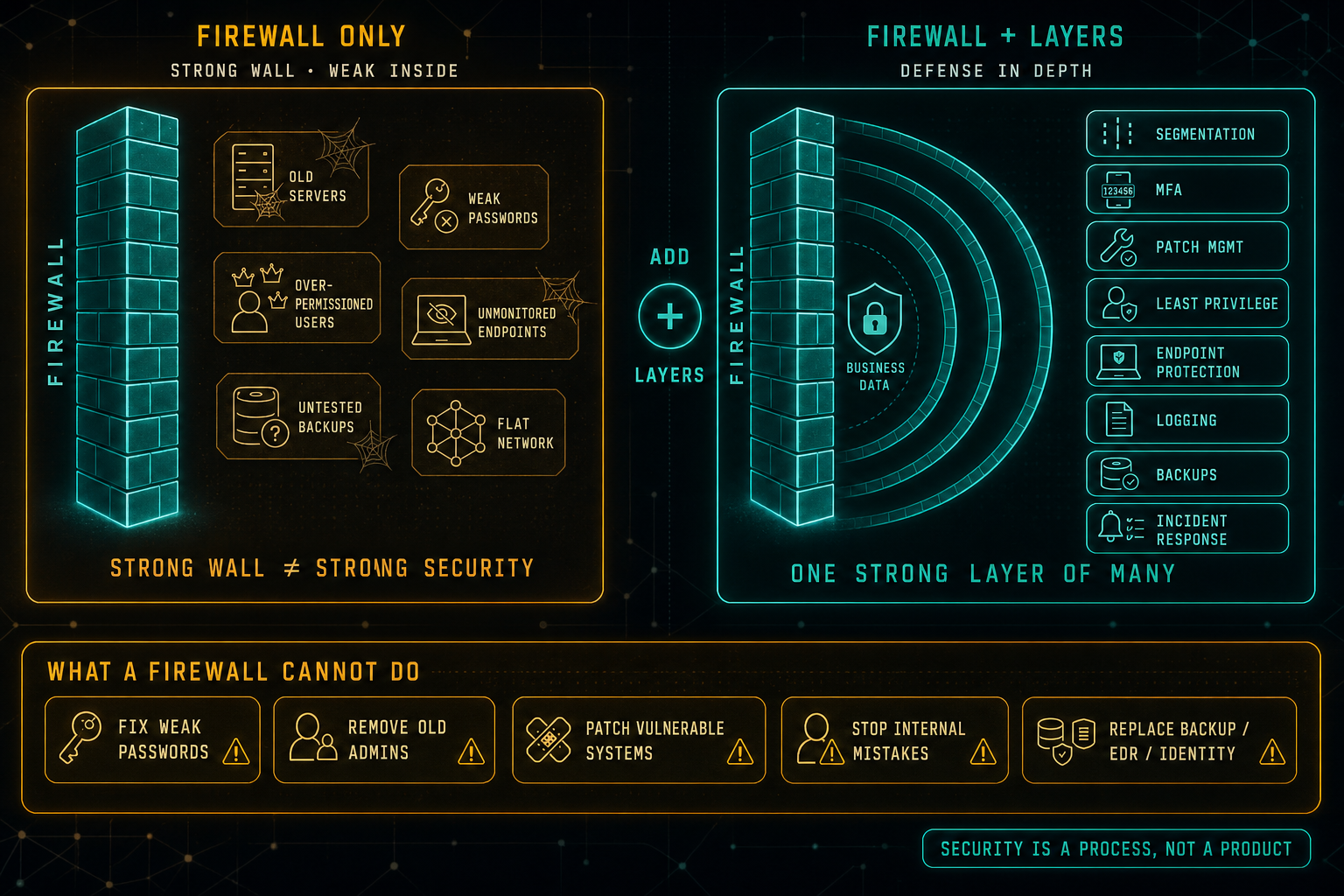
Defense in depth comparison. On the left, a 'firewall only' panel in amber shows a strong teal brick wall labeled 'firewall' with a messy interior behind it, old servers covered in cobwebs, weak passwords, over-permissioned users, unmonitored endpoints, untested backups, and a flat network, with the footer 'strong wall ≠ strong security'. On the right, a 'firewall + layers · defense in depth' panel in teal shows the same wall, but the interior is now organized as concentric shells protecting 'business data' at the core, with eight named security layers stacked on the side: segmentation, MFA, patch management, least privilege, endpoint protection, logging, backups, and incident response, with the footer 'one strong layer of many'. Between them, a small '+ add layers' badge. Below, a 'what a firewall cannot do' strip in amber lists five pills with warning triangles: fix weak passwords, remove old admins, patch vulnerable systems, stop internal mistakes, replace backup / EDR / identity. A corner pill closes with 'security is a process, not a product'.
Infrastructure Security·

Your Firewall Should Not Be Your Only Security Strategy

A strong firewall matters, but a strong firewall protecting a weak interior is still a weak environment. Old servers, weak passwords, over-permissioned users, unmonitored endpoints, untested backups, and flat networks do not stop being problems just because the perimeter is solid. Real security comes from layers, segmentation, MFA, patching, least privilege, endpoint protection, logging, backups, and incident response, all running together.
2 min readRead article
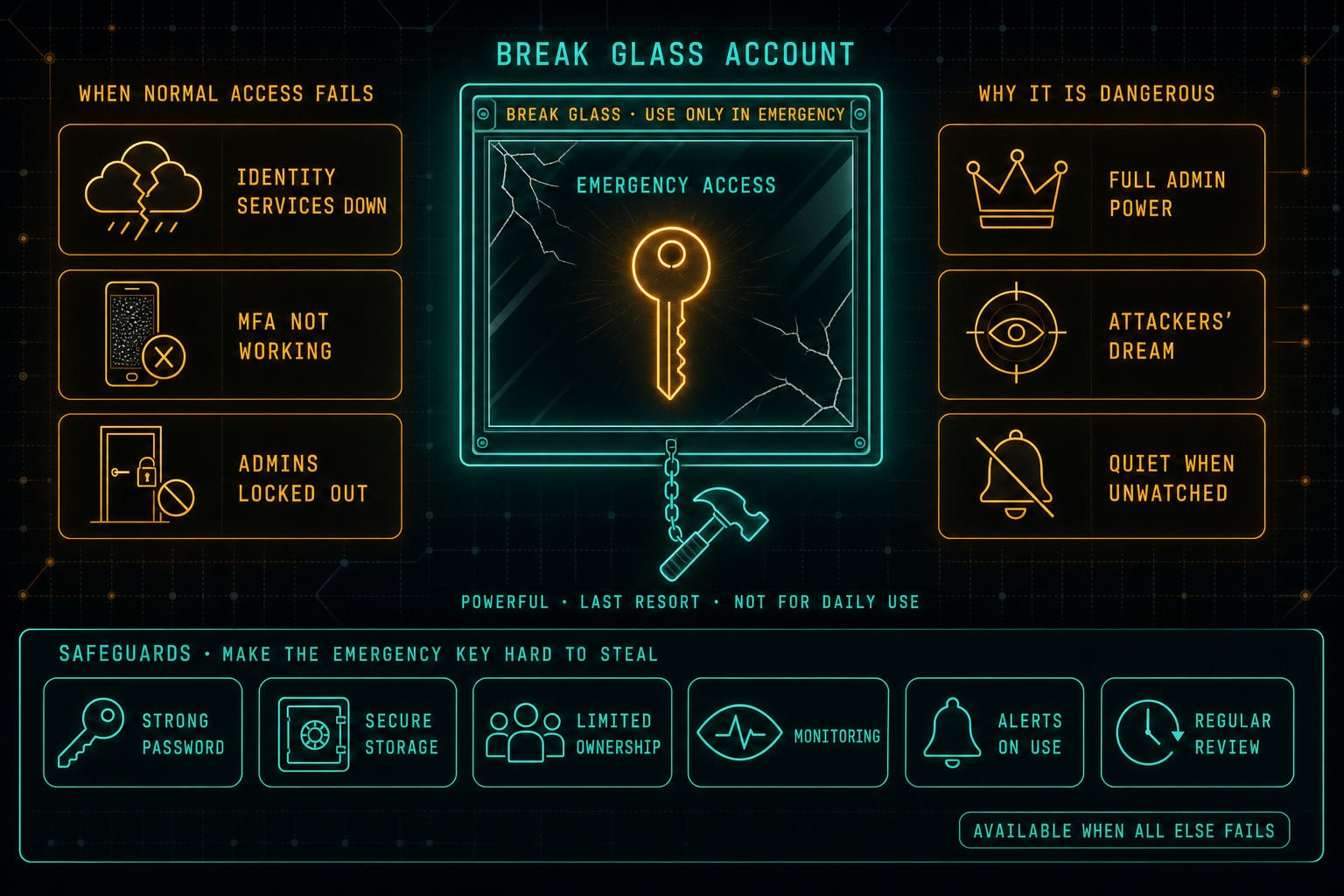
Break glass emergency admin account illustration. In the center, a 'break glass account' box behind a cracked glass overlay holds a glowing amber emergency key labeled 'emergency access', with a 'break glass · use only in emergency' banner across the top and a small hammer attached by a chain. Tags below read 'powerful · last resort · not for daily use'. On the left, a 'when normal access fails' panel in amber lists three failure scenarios, identity services down, MFA not working, admins locked out. On the right, a 'why it is dangerous' panel in amber lists three risks, full admin power, attackers' dream, quiet when unwatched. Below, a 'safeguards · make the emergency key hard to steal' strip shows six equal pills: strong password, secure storage, limited ownership, monitoring, alerts on use, regular review, with a corner pill 'available when all else fails'.
Access Security·

Break Glass Accounts: Necessary, but Dangerous

Every organization needs a backup plan for access. When identity services are down, MFA is broken, or the regular admins are locked out, break glass accounts are how the company gets back in. The same accounts are also a dream target for attackers, which is why they need strong credentials, safe storage, limited ownership, monitoring, alerts on use, and a real review cadence, not a sticky note in a drawer.
2 min readRead article
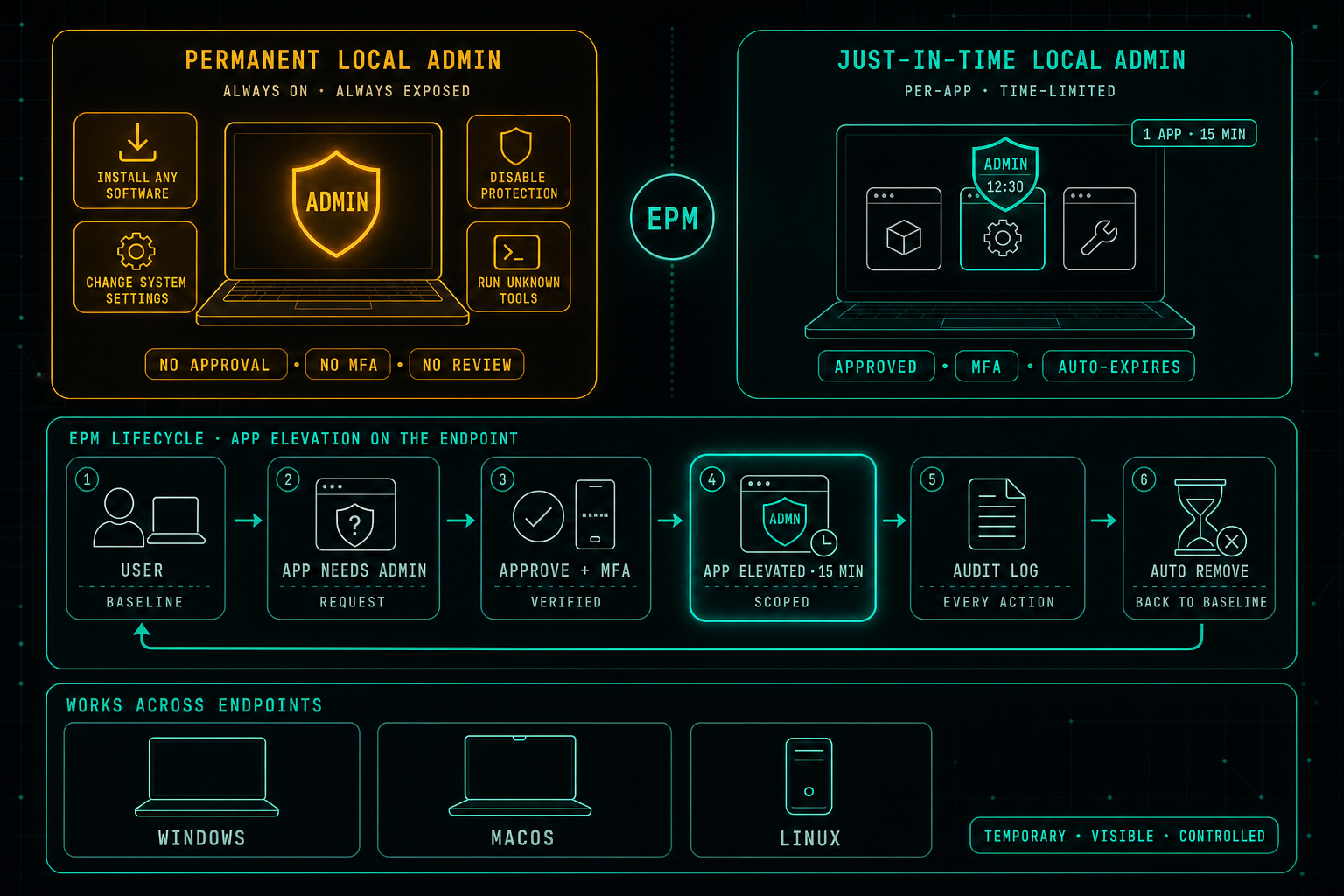
Two local-admin models compared. On the top-left, a 'permanent local admin' card in amber shows a laptop with a permanently lit amber 'admin' shield surrounded by four risk chips, install any software, change system settings, disable protection, run unknown tools, with footer pills 'no approval · no MFA · no review'. On the top-right, a 'just-in-time local admin' card in teal shows the same laptop where three app tiles sit on the screen but only one is elevated with a teal admin shield and a countdown timer reading '12:30', tagged '1 app · 15 min' with footer pills 'approved · MFA · auto-expires'. Between them, a small 'EPM' badge. Below, an 'EPM lifecycle · app elevation on the endpoint' panel shows six numbered stages connected by arrows: user (baseline) → app needs admin (request) → approve + MFA (verified) → app elevated · 15 min (scoped, highlighted) → audit log (every action) → auto remove (back to baseline), with a curved arrow returning to the start. At the bottom, a 'works across endpoints' strip shows three generic device illustrations labeled Windows, macOS, and Linux (no operating-system logos), with a 'temporary · visible · controlled' pill in the corner.
Access Security·

Local Admin Rights Should Not Be Permanent

Privileged access is not only a cloud problem. While most security work focuses on admin roles in Microsoft 365, cloud platforms, firewalls, and servers, the local admin rights sitting on every laptop are often quietly forgotten. Endpoint Privilege Management replaces permanent local admin with controlled, per-app, time-limited elevation, so users keep working without the endpoint becoming the soft underbelly of the environment.
2 min readRead article
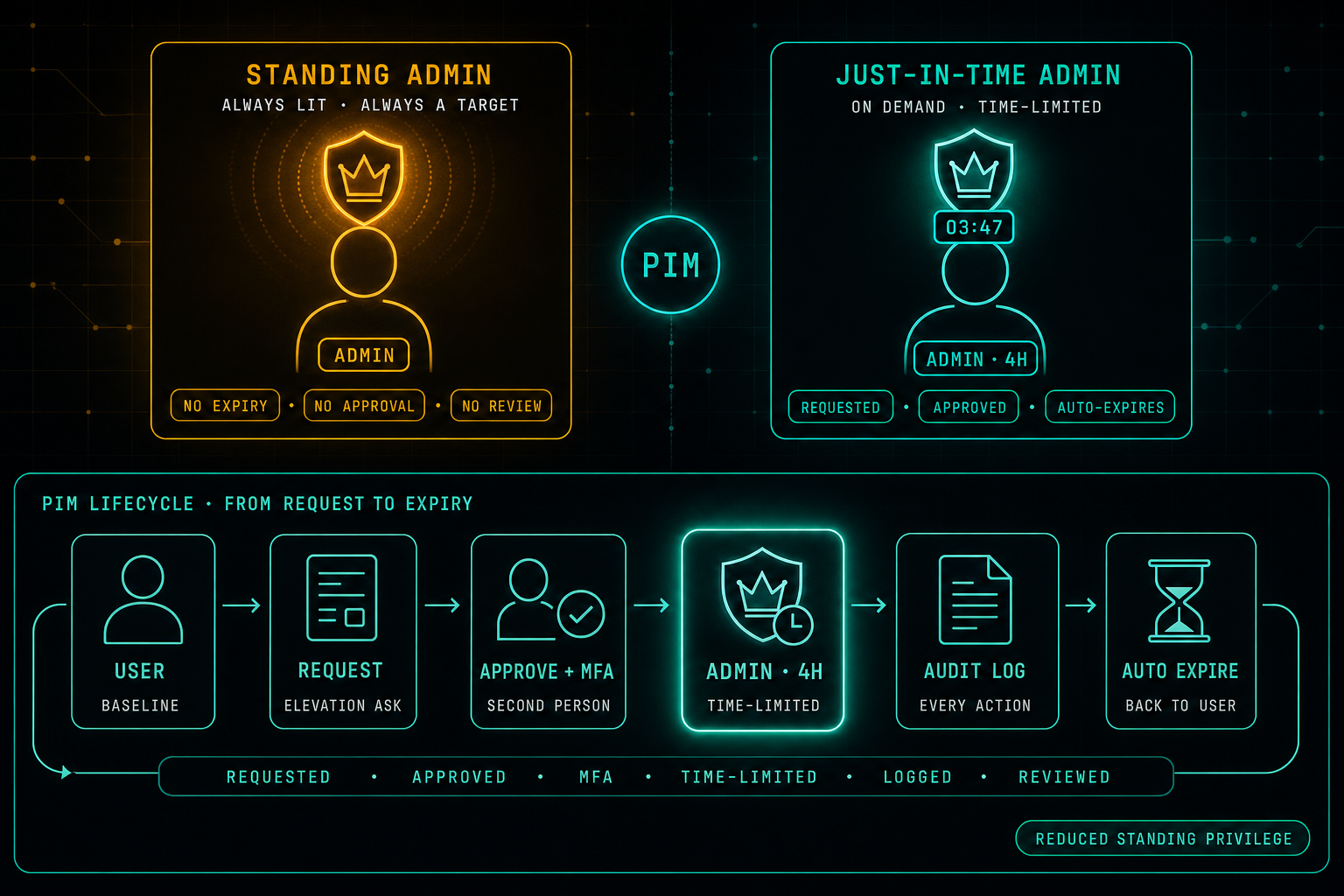
Two admin models compared. On the top-left, a 'standing admin' card in amber shows a user with a permanently lit crown and footer pills 'no expiry · no approval · no review'. On the top-right, a 'just-in-time admin' card in teal shows the same user with a teal crown attached to a small countdown timer reading '03:47', tagged 'admin · 4h' and 'requested · approved · auto-expires'. A small 'PIM' badge sits between them. Below, a 'PIM lifecycle · from request to expiry' panel shows six stages connected by arrows: user (baseline) → request (elevation ask) → approve + MFA (second person) → admin · 4h (time-limited, highlighted) → audit log (every action) → auto expire (back to user), with a curved arrow returning to the start, a labels strip reading 'requested · approved · MFA · time-limited · logged · reviewed', and a 'reduced standing privilege' pill in the corner.
Access Security·

Privileged Identity Management: Admin Access Should Not Be Permanent

Admin access is one of the most sensitive things in any organization, yet many companies still treat it as something permanent. Permissions are granted and quietly stay. Privileged Identity Management flips the model, admin rights are requested when needed, approved, MFA-enforced, time-limited, logged, and reviewed. The goal is not to make work harder. It is to make admin access controlled, visible, and temporary.
2 min readRead article
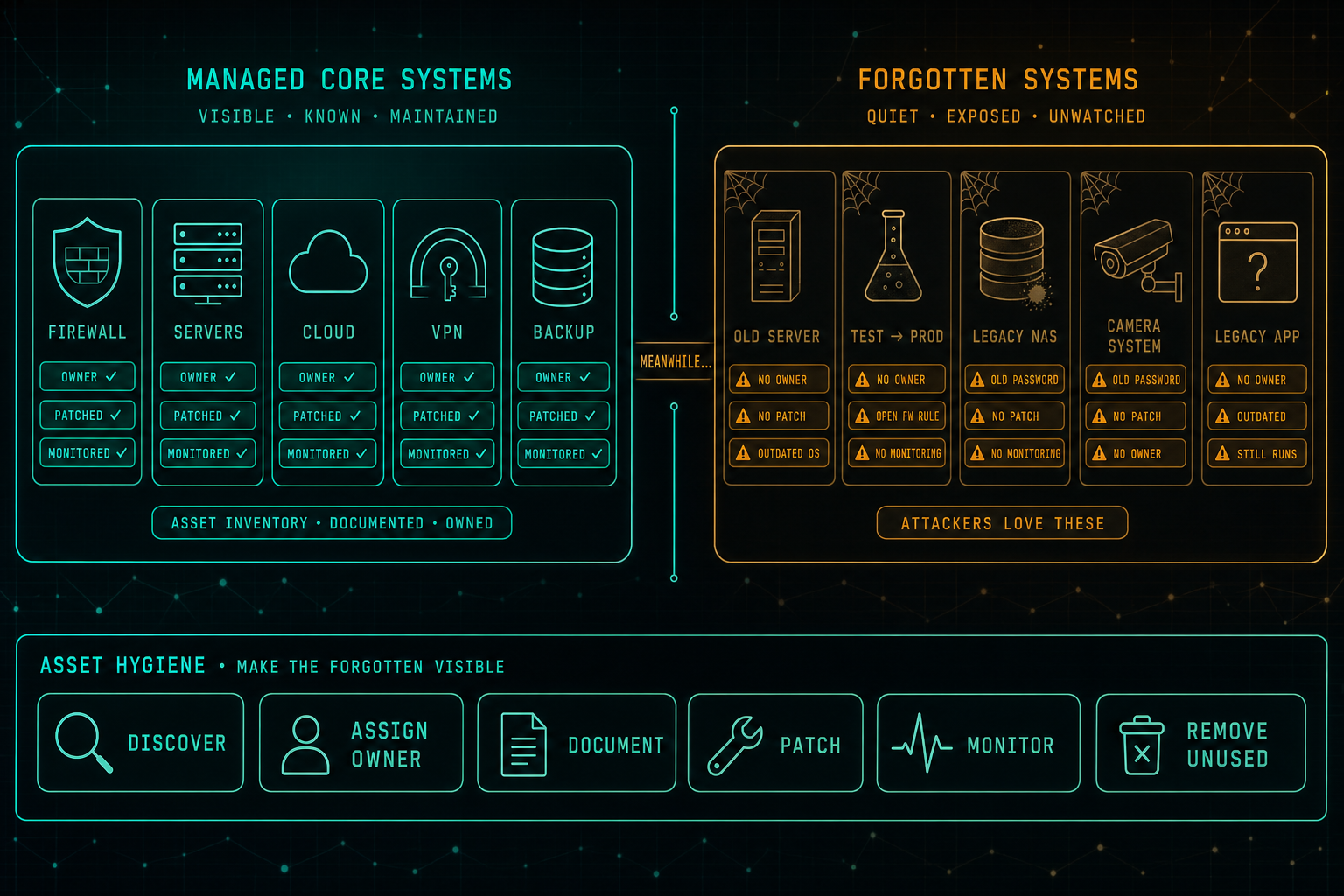
Comparison of two sides of the same IT environment. On the left, a 'managed core systems' panel in teal shows five well-maintained assets, firewall, servers, cloud, VPN, and backup, each card carrying owner, patched, and monitored check marks, with a footer 'asset inventory · documented · owned'. In the center, a small 'meanwhile...' label. On the right, a 'forgotten systems' panel in amber shows five quietly neglected assets, old server, test that became production, legacy NAS, camera system, legacy app, each card decorated with cobwebs and amber warning pills for no owner, no patch, outdated OS, open firewall rule, no monitoring, and old passwords, with a footer 'attackers love these'. Below, an 'asset hygiene · make the forgotten visible' strip lists six equally weighted actions: discover, assign owner, document, patch, monitor, remove unused.
Infrastructure Security·

The Forgotten Server Is the Real Risk

Every company has the systems everyone talks about, the firewall, the main servers, the cloud, the VPN, the backup platform. The real risk usually lives somewhere else: the old server nobody wants to touch, the test machine that became production, the legacy NAS, the camera system with an ancient password, the application that still works but has no owner. The problem is rarely technology. It is ownership.
2 min readRead article
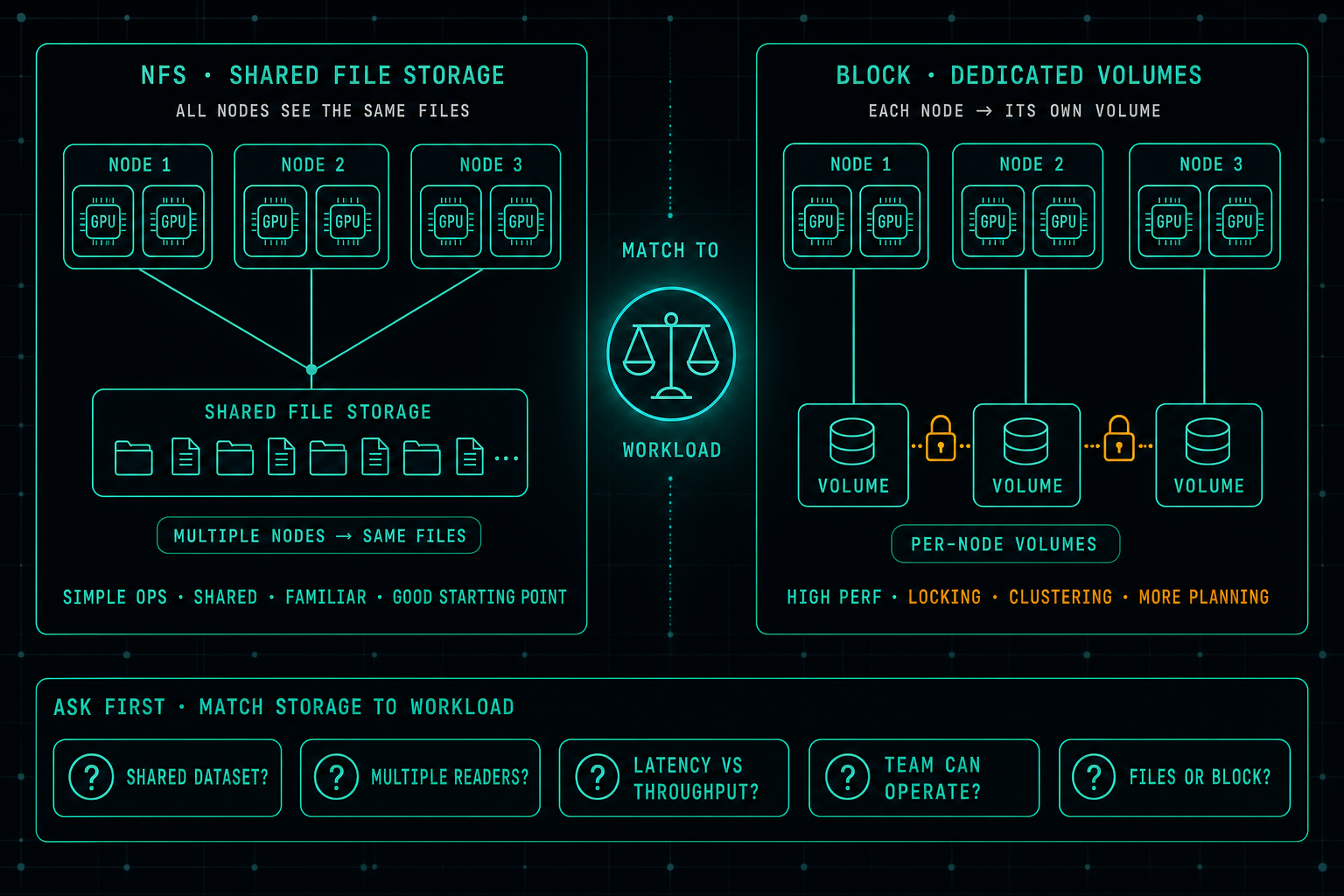
Side-by-side comparison of two AI storage architectures. On the left, an 'NFS · shared file storage' panel where three GPU nodes converge onto a single shared file storage with folder and file icons, tagged 'multiple nodes → same files' and footer tags 'simple ops · shared · familiar · good starting point'. In the center, a balance scale labeled 'match to workload'. On the right, a 'block · dedicated volumes' panel where each of three GPU nodes connects to its own dedicated volume, with small amber lock icons between volumes, tagged 'per-node volumes' and footer tags 'high perf · locking · clustering · more planning'. Below, a strip labeled 'ask first · match storage to workload' lists five workload questions: shared dataset? multiple readers? latency vs throughput? team can operate? files or block?
AI Infrastructure·

AI Storage: Why Fast GPUs Still Wait for Data

In AI infrastructure, the real bottleneck is often not the GPU, it is the storage. When data does not arrive fast enough, expensive GPUs sit idle. A well-designed NFS setup is still a great starting point for many AI workloads, and jumping straight to block storage usually buys complexity before it buys performance. The better question is which storage matches the workload the team can actually operate.
3 min readRead article
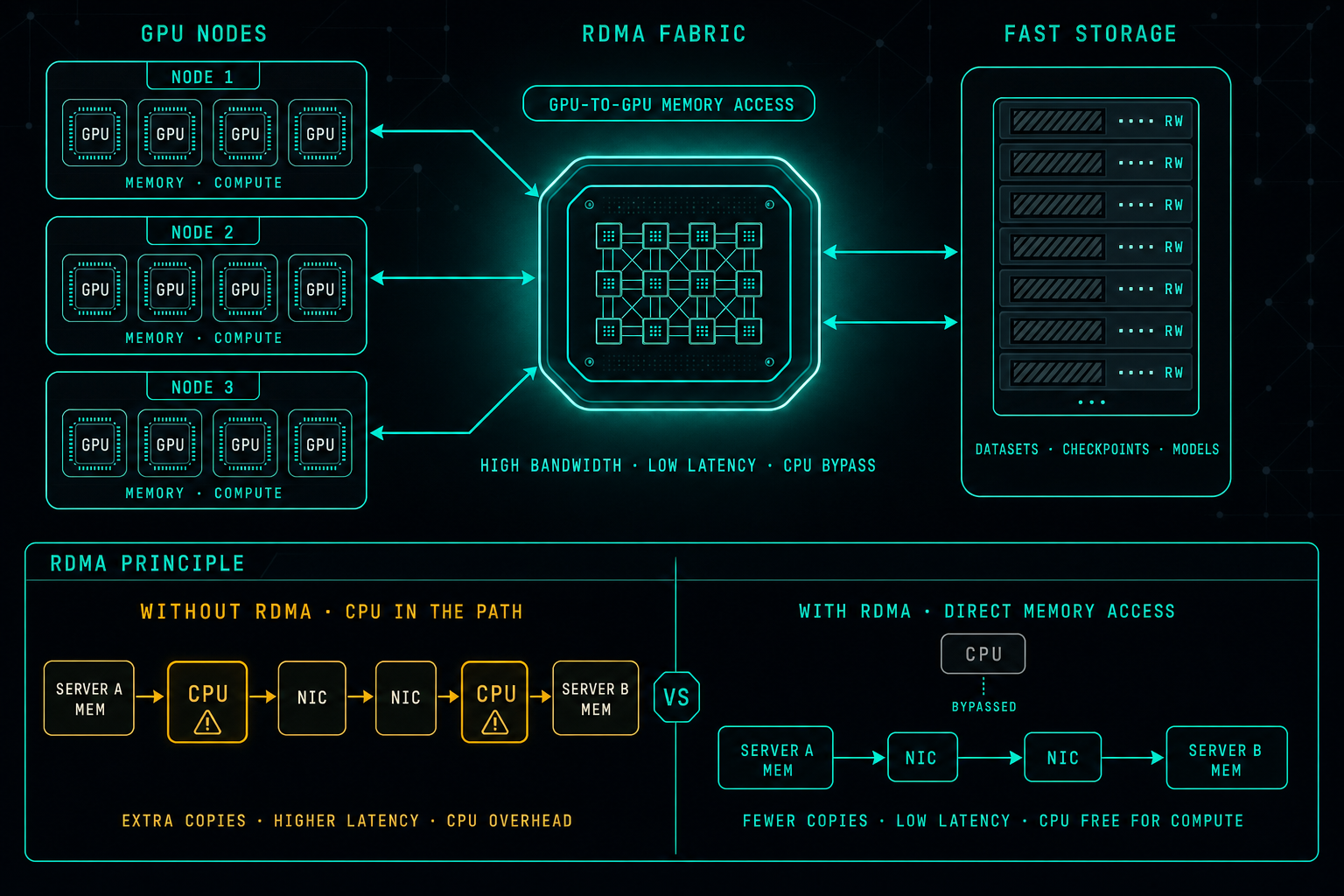
Diagram of an AI cluster using RDMA. On the left, three GPU nodes each with four GPUs labeled 'memory · compute'. In the middle, a glowing 'RDMA fabric' switch with the tags 'high bandwidth · low latency · CPU bypass' and a 'GPU-to-GPU memory access' pill, connected to the GPU nodes and to a fast storage tier on the right labeled 'datasets · checkpoints · models'. Below, an 'RDMA principle' panel compares two flows: 'without RDMA · CPU in the path' showing server A mem → CPU → NIC → NIC → CPU → server B mem in amber with warning icons on the CPU boxes, and 'with RDMA · direct memory access' showing server A mem → NIC → NIC → server B mem in teal with a bypassed CPU off to the side.
AI Infrastructure·

RDMA: Why It Matters for AI Infrastructure

Modern AI workloads run across many GPUs, many servers, and large datasets. At that scale the network is just as important as the compute. RDMA lets one server access memory on another with very low latency and minimal CPU involvement, so GPUs can spend time on math instead of waiting on the network. It is not a checkbox, but it is the difference between a fast GPU cluster and an expensive one that is mostly idle.
2 min readRead article
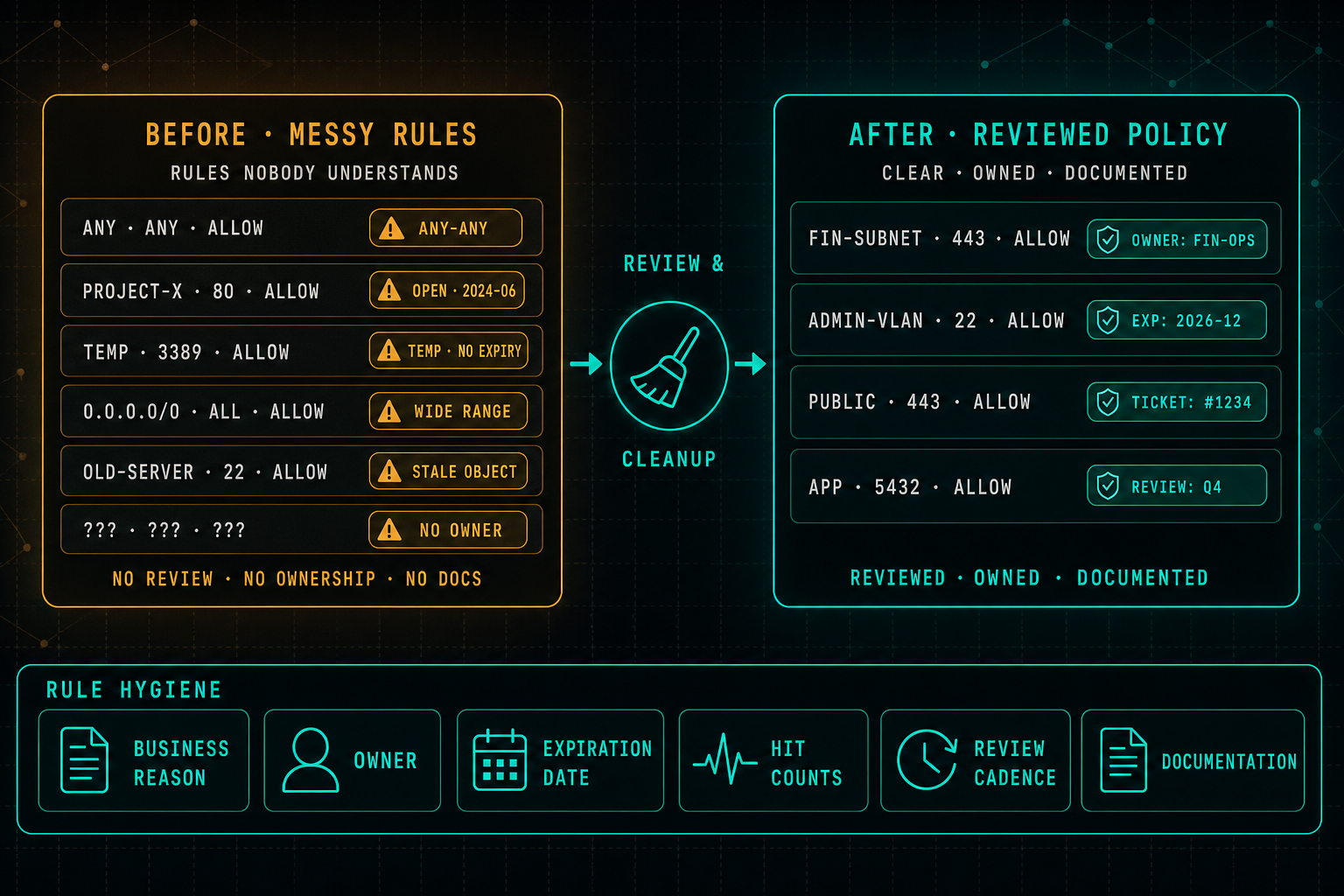
Side-by-side comparison of a firewall rule base before and after a cleanup. On the left, a 'before · messy rules' panel in amber shows six rules with warning pills: any-any, open from 2024-06, temp with no expiry, wide range 0.0.0.0/0, stale object, and no owner. In the middle, a broom icon labeled 'review & cleanup' with arrows pointing from left to right. On the right, an 'after · reviewed policy' panel in teal shows four cleaner rules with pills for owner, expiration, ticket reference, and review cadence. A bottom 'rule hygiene' strip lists six equally weighted pillars: business reason, owner, expiration date, hit counts, review cadence, and documentation.
Infrastructure Security·

Firewall Rules: Clean Rules Are Safer Rules

Firewall rules are easy to create and much harder to maintain. Over time the rule base fills up with old projects, temporary access that never expired, wide ranges, stale objects, and rules nobody fully understands anymore. Clean rules, with owners, business justification, expiration dates, hit counts, and a review cadence, are not just tidier. They are measurably safer.
2 min readRead article
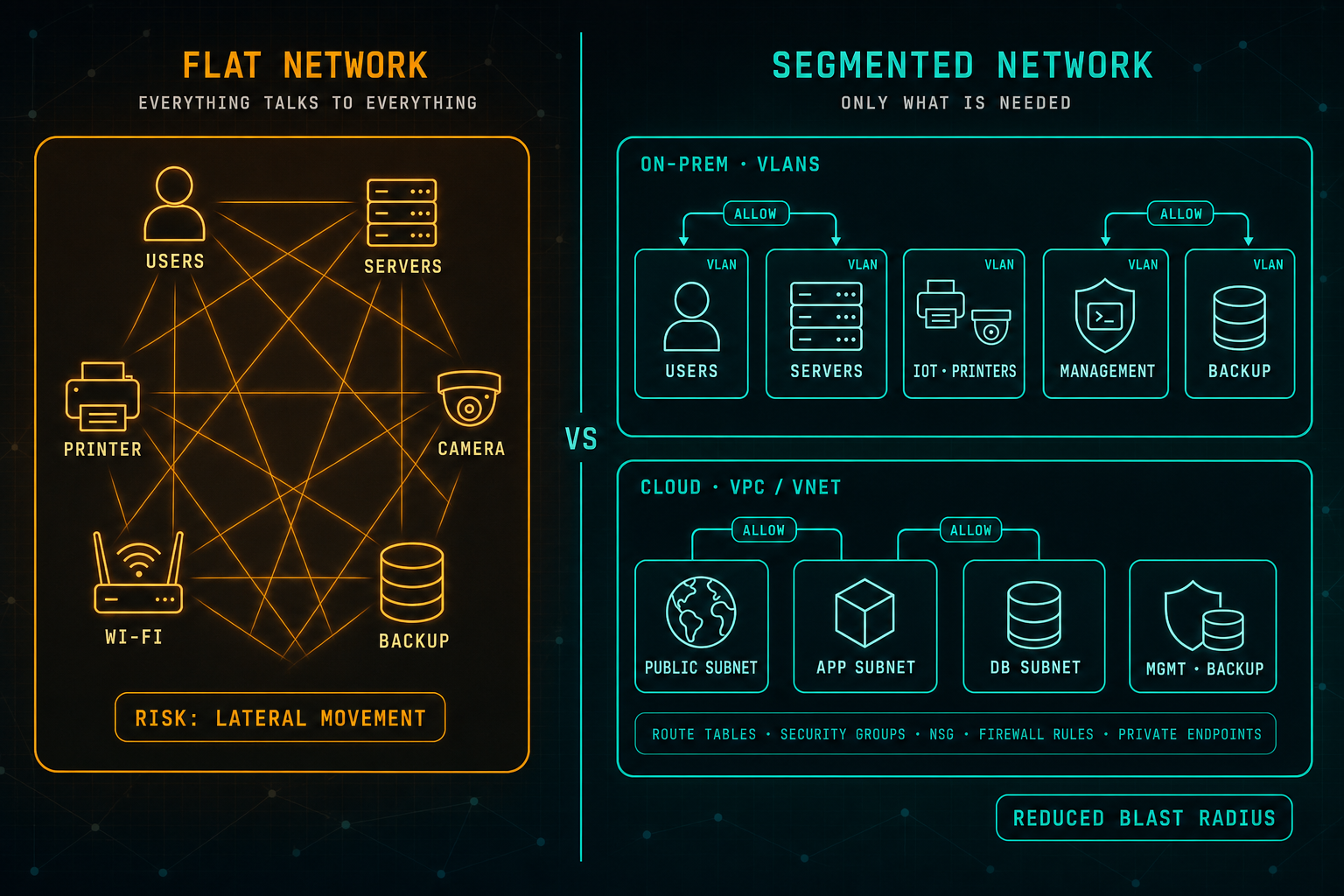
Side-by-side comparison of a flat network and a segmented network. On the left, a single rectangle places users, servers, printers, cameras, Wi-Fi, and backup on the same plane with an amber mesh connecting every node to every other node, labeled 'risk: lateral movement'. On the right, a segmented design organizes the same resources into clearly bordered VLANs on-prem (users, servers, IoT / printers, management, backup) and clearly bordered cloud subnets inside a VPC / VNet (public, app, db, management / backup), with only specific ALLOW lines drawn between the paths that real workflows need, and a footer strip listing route tables, security groups, NSG, firewall rules, and private endpoints, labeled 'reduced blast radius'.
Infrastructure Security·

Network Segmentation: Do Not Put Everything on the Same VLAN

Network segmentation is one of the most basic security principles, and one of the most ignored. Flat networks are easy to build but easy to abuse, one compromised endpoint can reach far too much. Whether it is VLANs on-prem or subnets, security groups, and private endpoints in the cloud, every system should only talk to what it really needs.
2 min readRead article
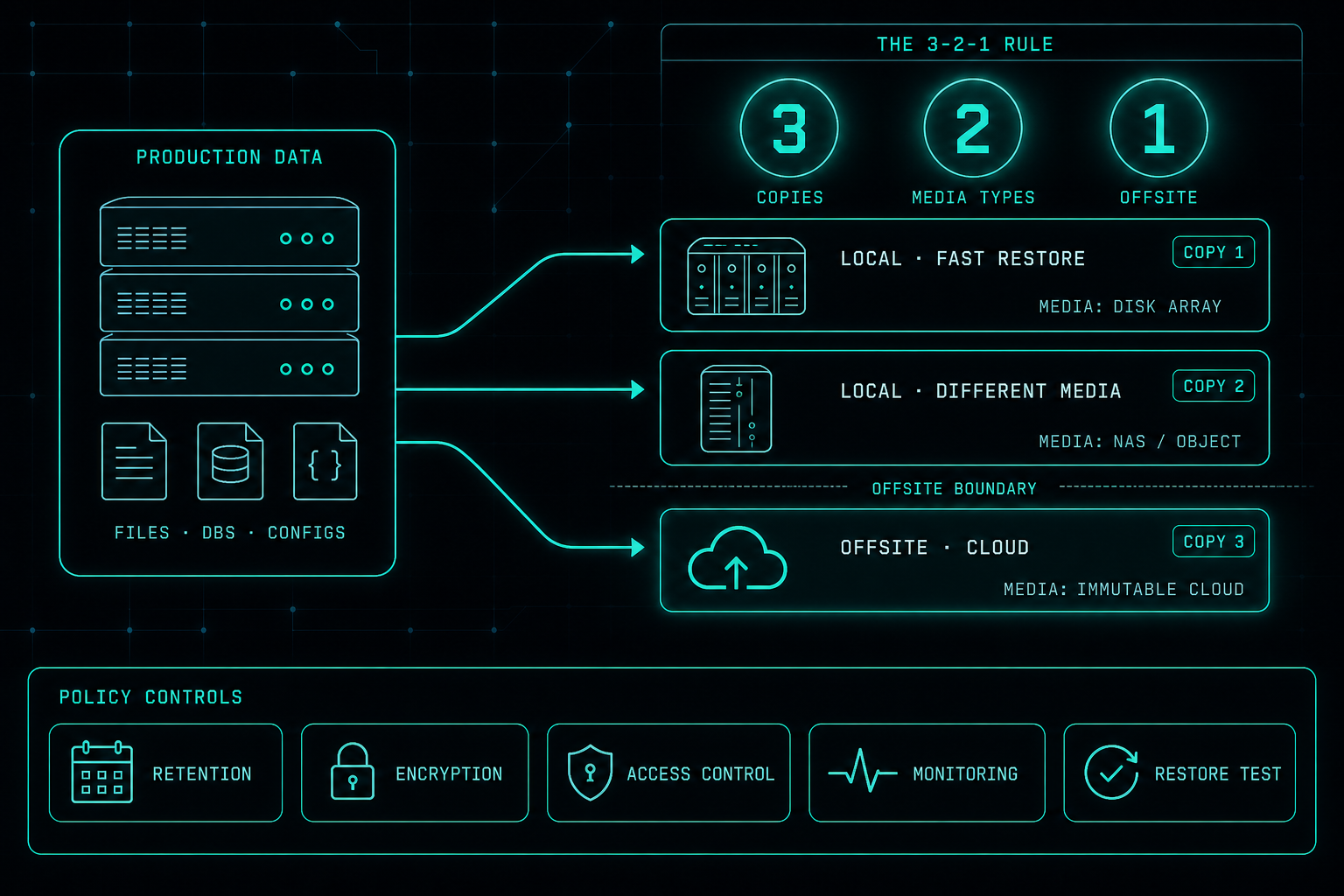
Diagram of the 3-2-1 backup rule showing production data on the left with three flow lines fanning out to three destination boxes: a local disk array for fast restore, a local NAS or object store on different media, and an offsite immutable cloud copy below an offsite boundary line. A bottom strip lists five equally weighted policy controls: retention, encryption, access control, monitoring, and restore test.
Infrastructure Security·

Backup Policy: Local, Cloud, and the 3-2-1 Rule

Owning a backup tool is not the same as having a backup policy. A policy says what is protected, how often, where copies live, who is responsible, and how restore is tested. The 3-2-1 rule, combined with local and cloud copies, is still the simplest way to make sure one failure does not take the business down.
2 min readRead article
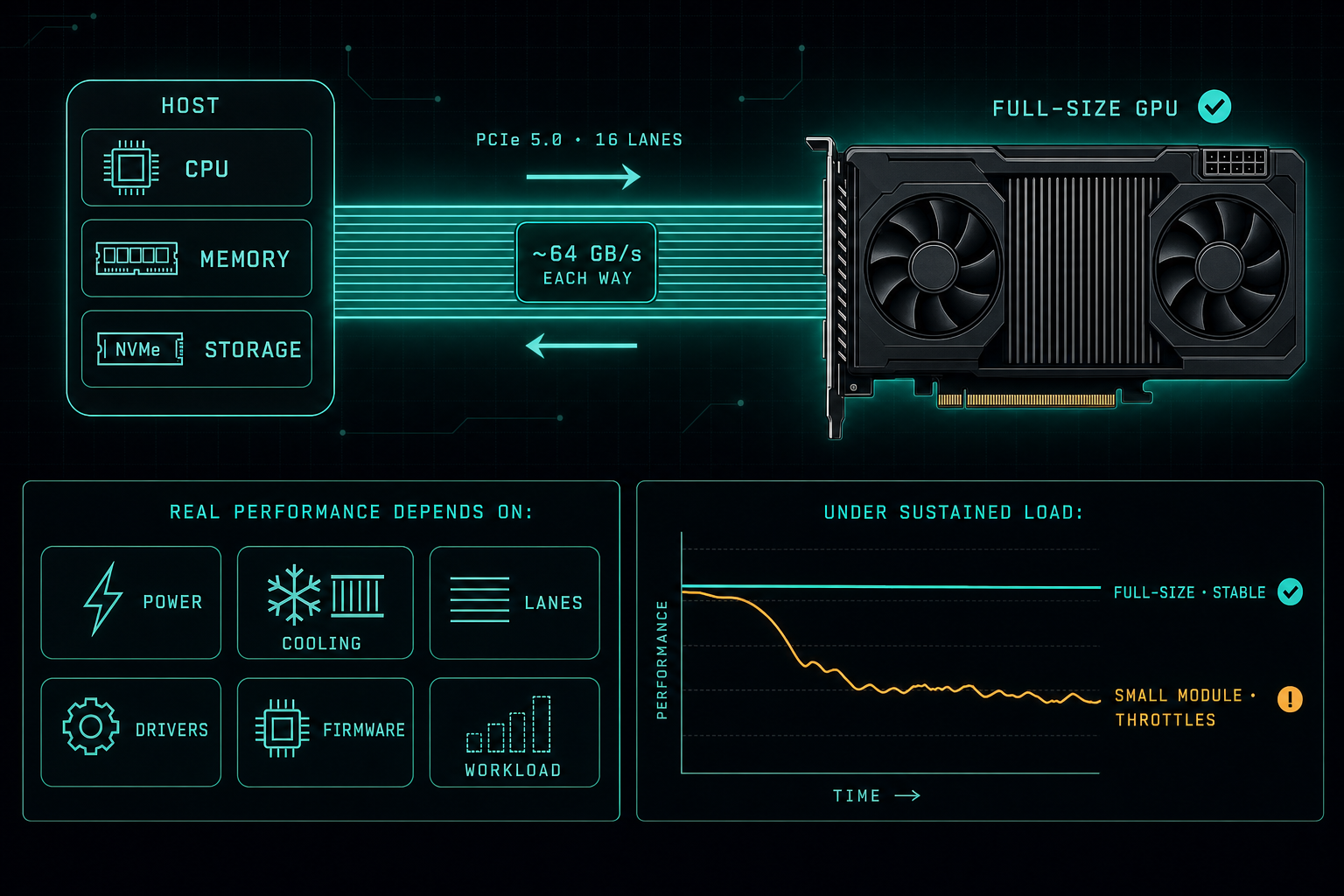
Diagram of a host with CPU, memory, and storage connected to a full-size GPU through a PCIe 5.0 x16 link annotated with around 64 GB/s in each direction, alongside a row of six equally weighted performance factors (power, cooling, lanes, drivers, firmware, workload) and a sustained-load chart showing a full-size GPU staying stable while a small module throttles over time.
AI Infrastructure·

PCIe 5.0 for GPUs: Speed Matters, but Design Matters More

PCIe 5.0 x16 gives a GPU around 64 GB/s of bandwidth in each direction. That is impressive on paper. What actually decides whether a Local LLM stays stable under hours of load is power, cooling, lanes, drivers, firmware, and the real workload, not the PCIe version on the spec sheet.
2 min readRead article
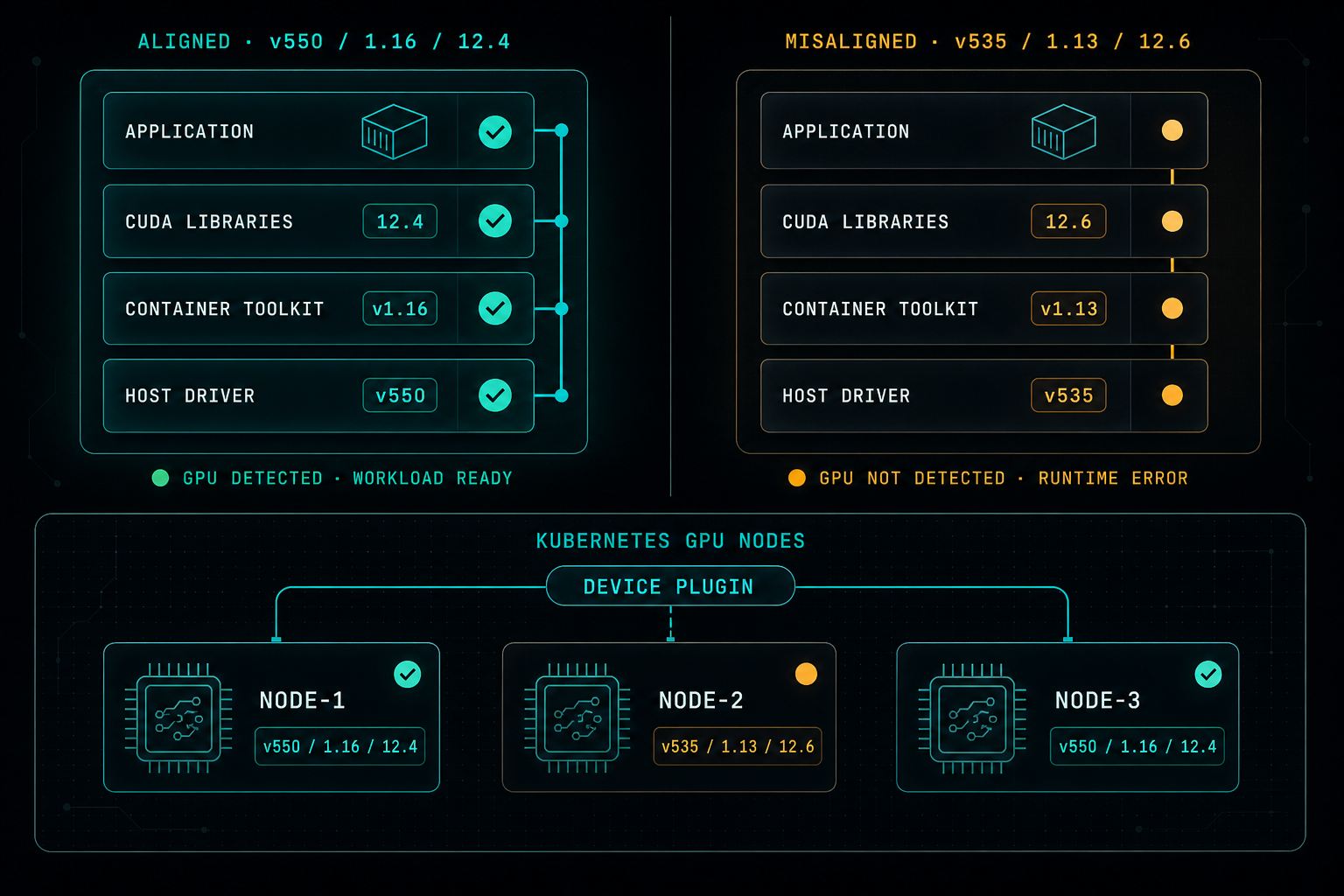
Side-by-side diagram showing an aligned GPU stack with matching host driver, container toolkit, CUDA libraries, and application versions next to a misaligned stack with shifted versions and a broken alignment line, plus a Kubernetes GPU node row where two nodes match and one node has drifted and fails through the device plugin.
AI Infrastructure·

NVIDIA CUDA in Containers: Version Alignment Matters

Running GPU workloads in Docker or Kubernetes is powerful, but most outages are not in the application. They come from small mismatches between the host driver, the CUDA libraries in the image, the Container Toolkit, and the Kubernetes node config. Stable GPU environments start with version alignment.
2 min readRead article
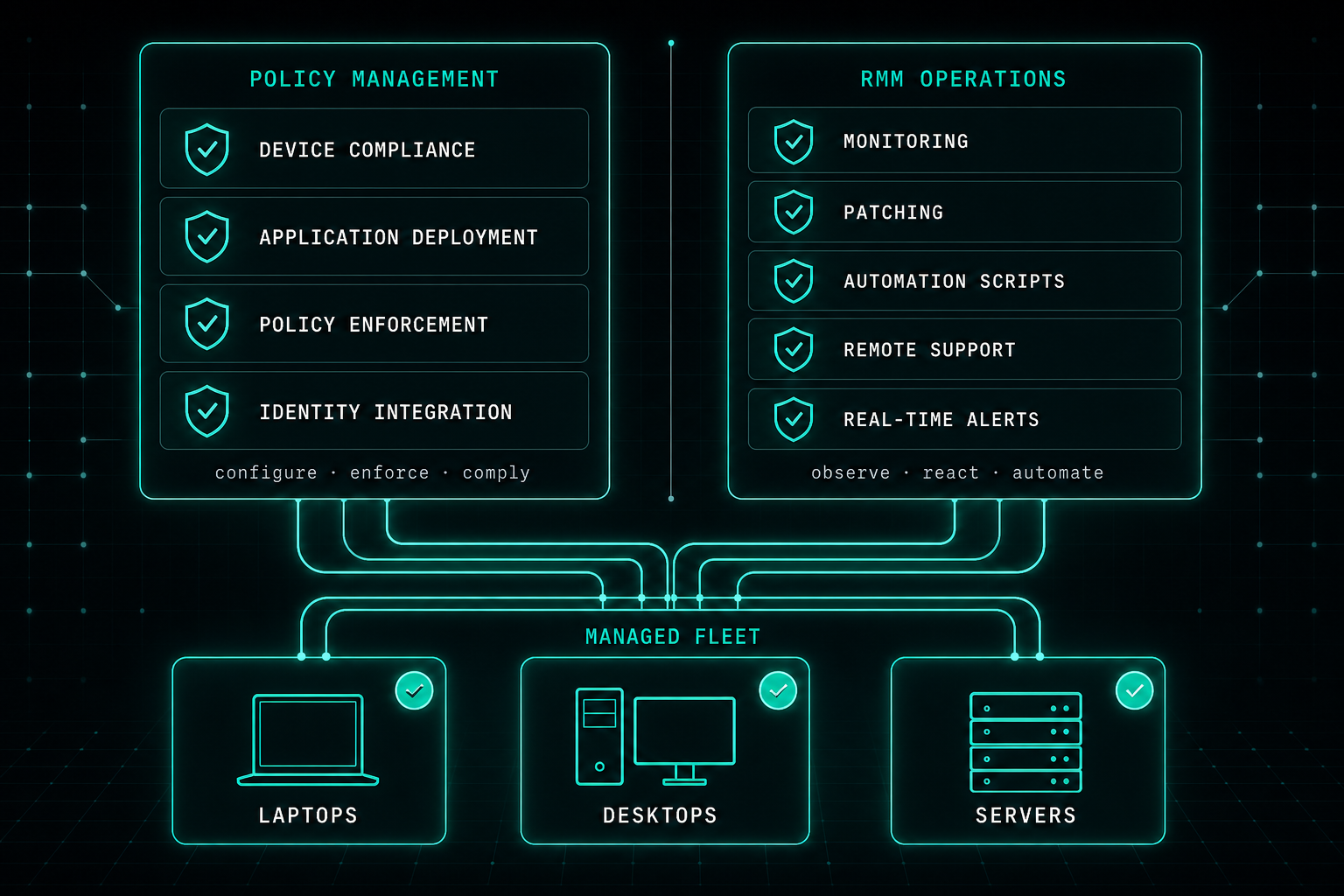
Balanced endpoint management architecture showing a policy management layer with device compliance, application deployment, policy enforcement, and identity integration alongside an RMM operations layer with monitoring, patching, automation scripts, remote support, and real-time alerts, both layers connecting down to a managed fleet of laptops, desktops, and servers.
Infrastructure Strategy·

NinjaOne RMM: Why Intune Is Not Always Enough

Intune is a strong platform for policy and device compliance. It does not always cover the day-to-day operational reality. RMM platforms like NinjaOne add monitoring, automation, patching, and remote support so IT teams stay ahead of incidents instead of behind tickets.
2 min readRead article
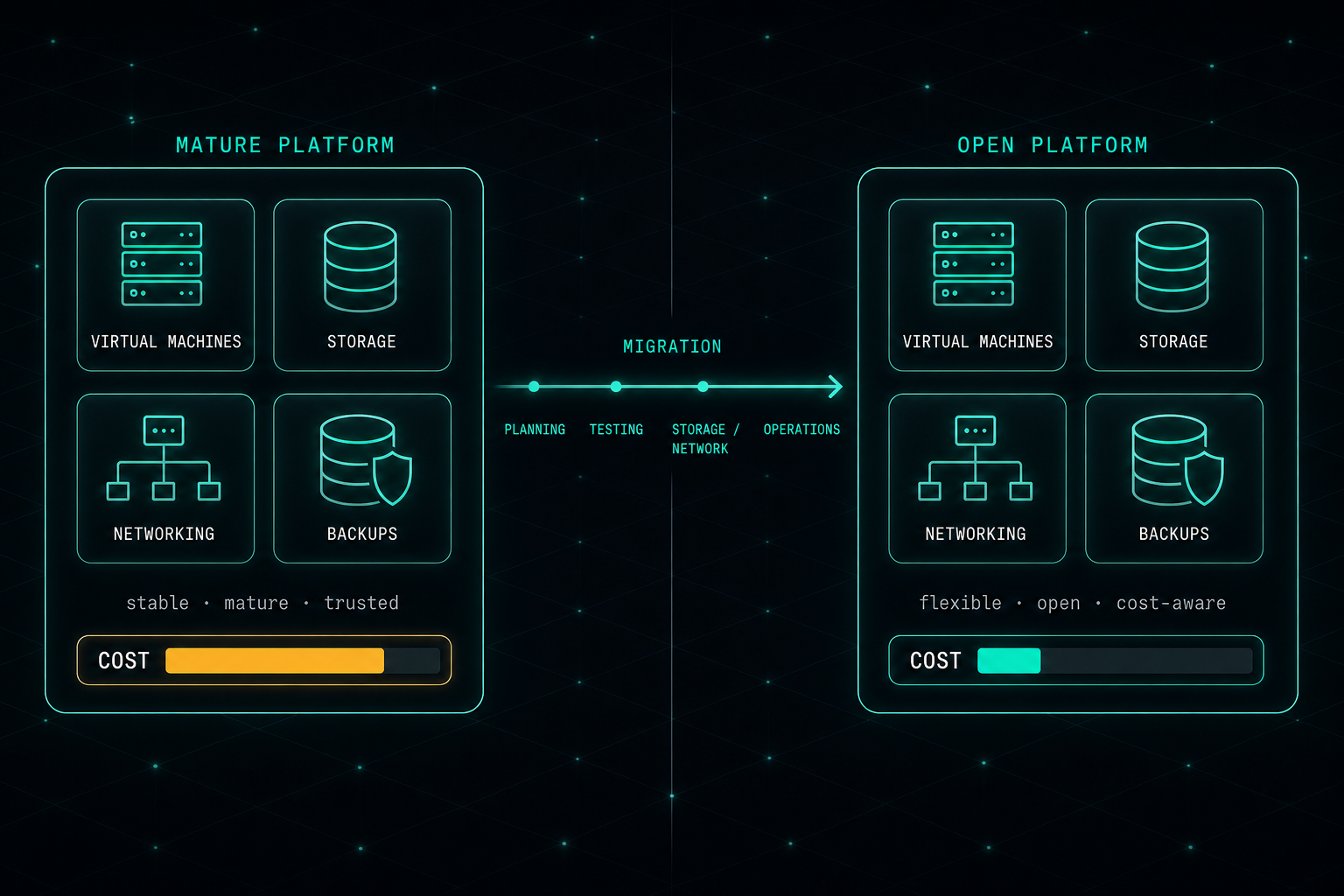
Balanced enterprise virtualization comparison showing a mature platform and an open platform side by side, each with the same virtual machines, storage, networking, and backups, separated by a migration arrow with planning, testing, storage and network, and operations stages. A cost meter under each platform shows the open platform at a lower cost.
Infrastructure Strategy·

Proxmox: When Cost Forces a Real Infrastructure Decision

VMware is still an excellent, mature platform. But the price has changed the conversation. For many organizations, moving to Proxmox is no longer about replacing something bad with something better. It is about making infrastructure decisions that also make financial sense.
3 min readRead article
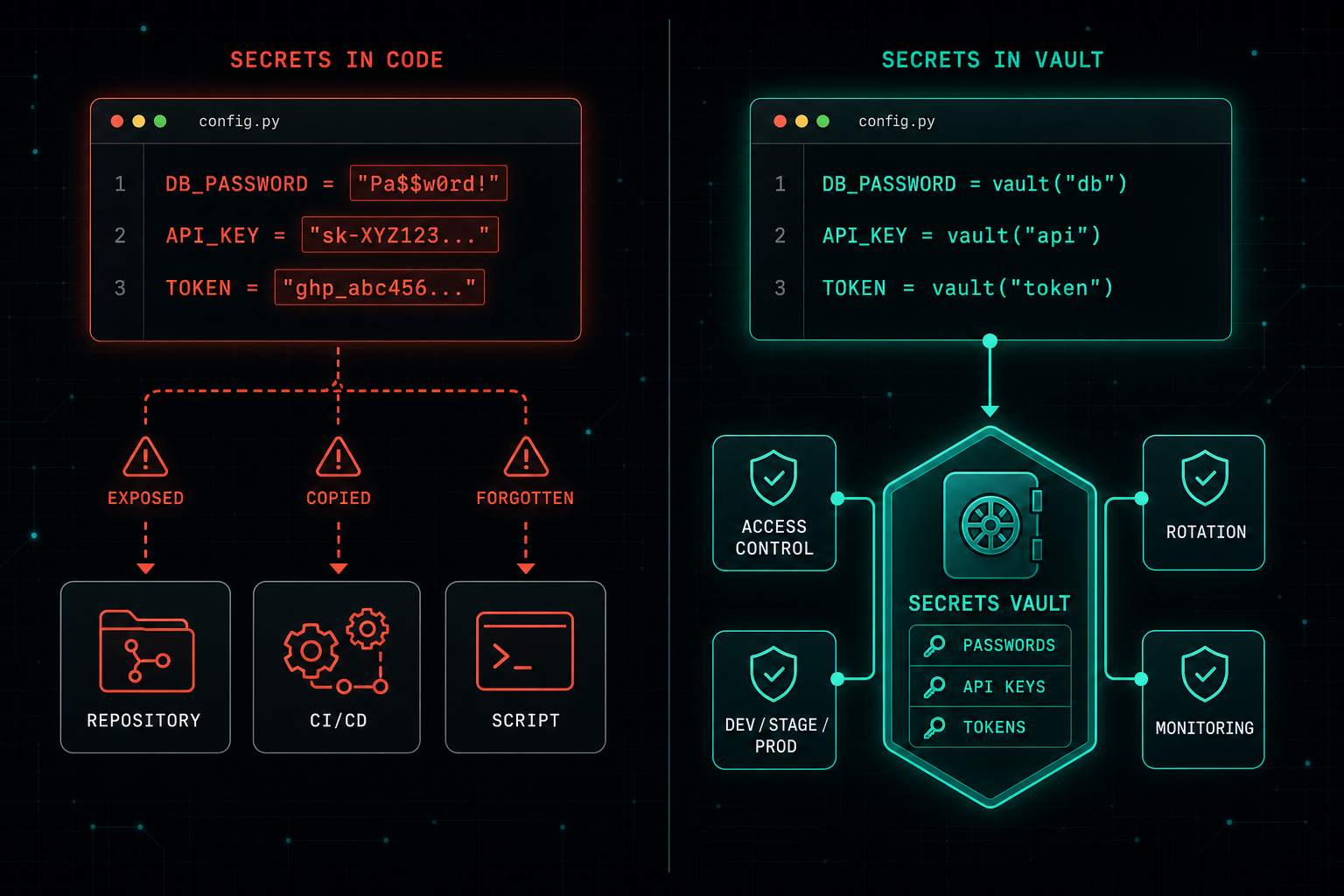
Diagram contrasting an unsafe pattern where passwords, API keys, and tokens are embedded directly in a config file and spread to repositories, CI/CD pipelines, and scripts, against a safer pattern where the code only references a central secrets vault with access control, rotation, dev-stage-prod separation, and monitoring.
Infrastructure Security·

Secrets Management: Stop Saving Passwords in Code

Saving passwords, API keys, or tokens inside code feels quick, but the moment they hit a repository or CI pipeline, they are not really private anymore. Code defines what the application does. Secrets should never live inside it.
2 min readRead article
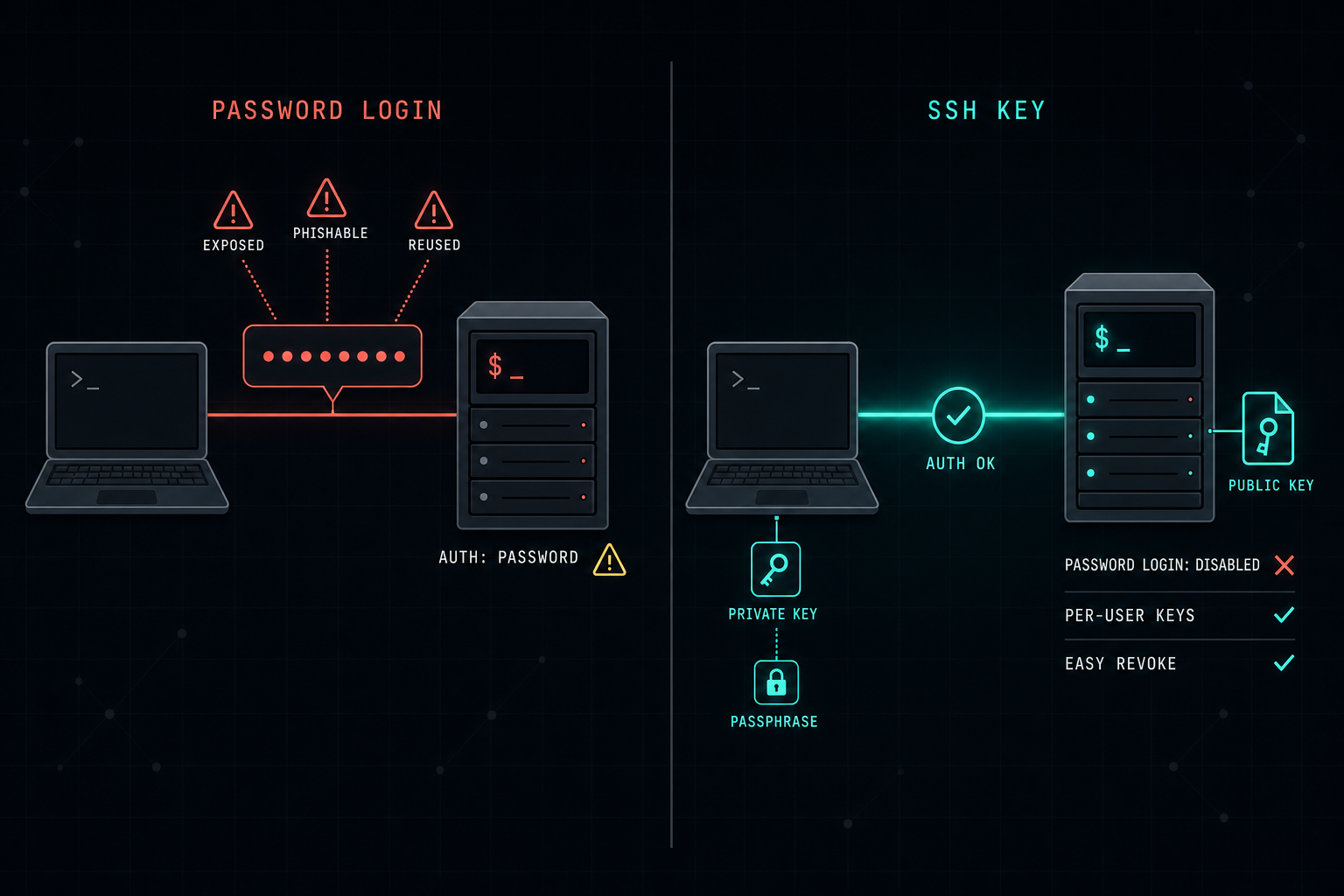
Diagram contrasting password-based SSH access, where the password is exposed on the wire with warnings for exposed, phishable, and reused credentials, against SSH key authentication where a passphrase-protected private key on the workstation authenticates against a public key on the Linux server, with password login disabled, per-user keys, and easy revoke.
Infrastructure Security·

SSH Keys: A Better Way to Access Linux Servers

Many Linux servers still rely on a username and password. SSH key authentication is more secure, easier to manage, and removes passwords from the wire. For production servers, password-based SSH should not be the default.
2 min readRead article
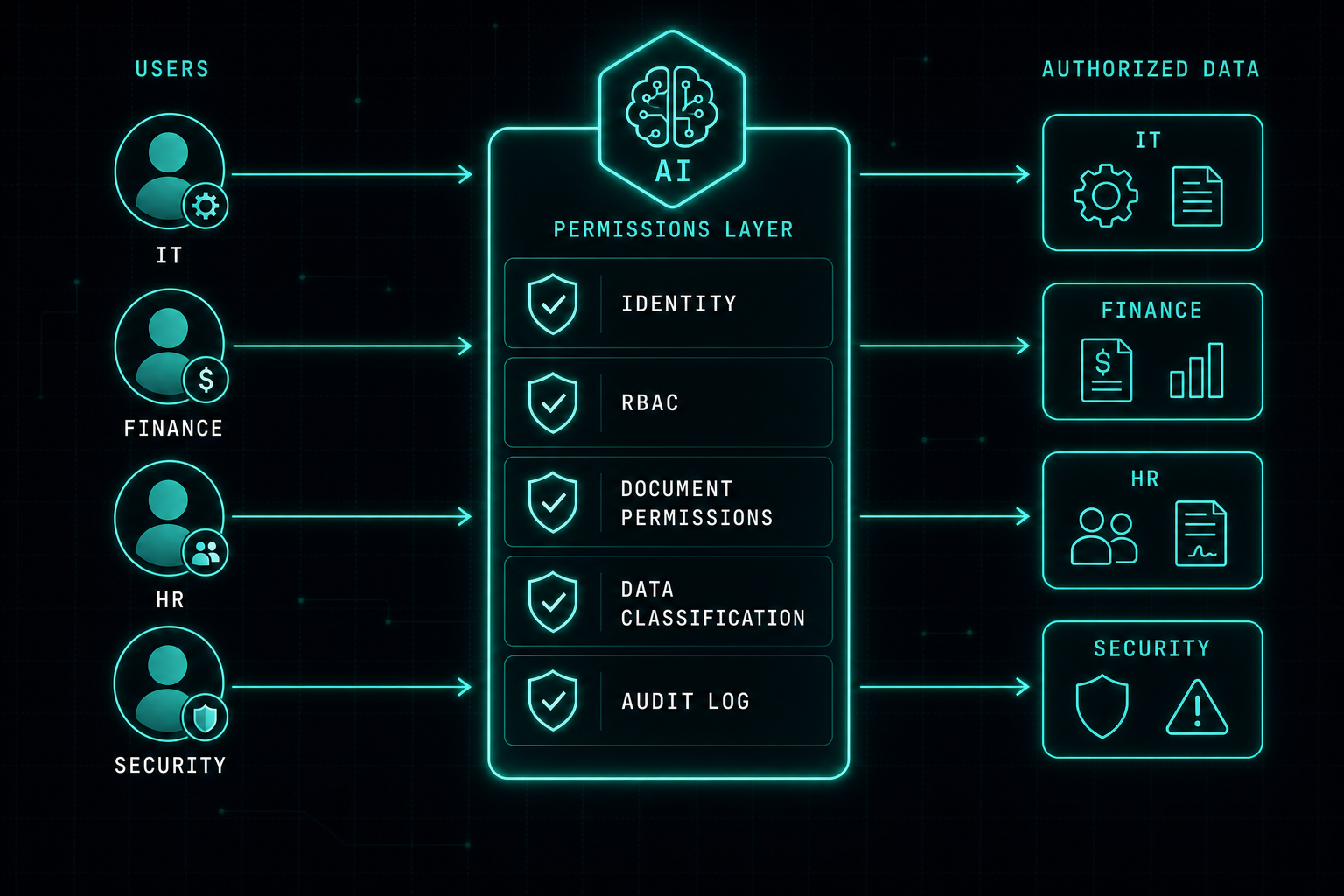
Diagram showing four users with different roles (IT, Finance, HR, and Security) sending the same question to a shared AI, with a permissions layer enforcing identity, RBAC, document permissions, data classification, and audit logging so each user only receives the data they are allowed to see.
AI Security·

AI Permissions: Your AI Should Follow the Same Rules as Your Users

If an employee cannot open a financial document, the AI should not show them that data either. AI does not remove the need for identity, role-based access, and audit logs. It makes those controls more important.
2 min readRead article
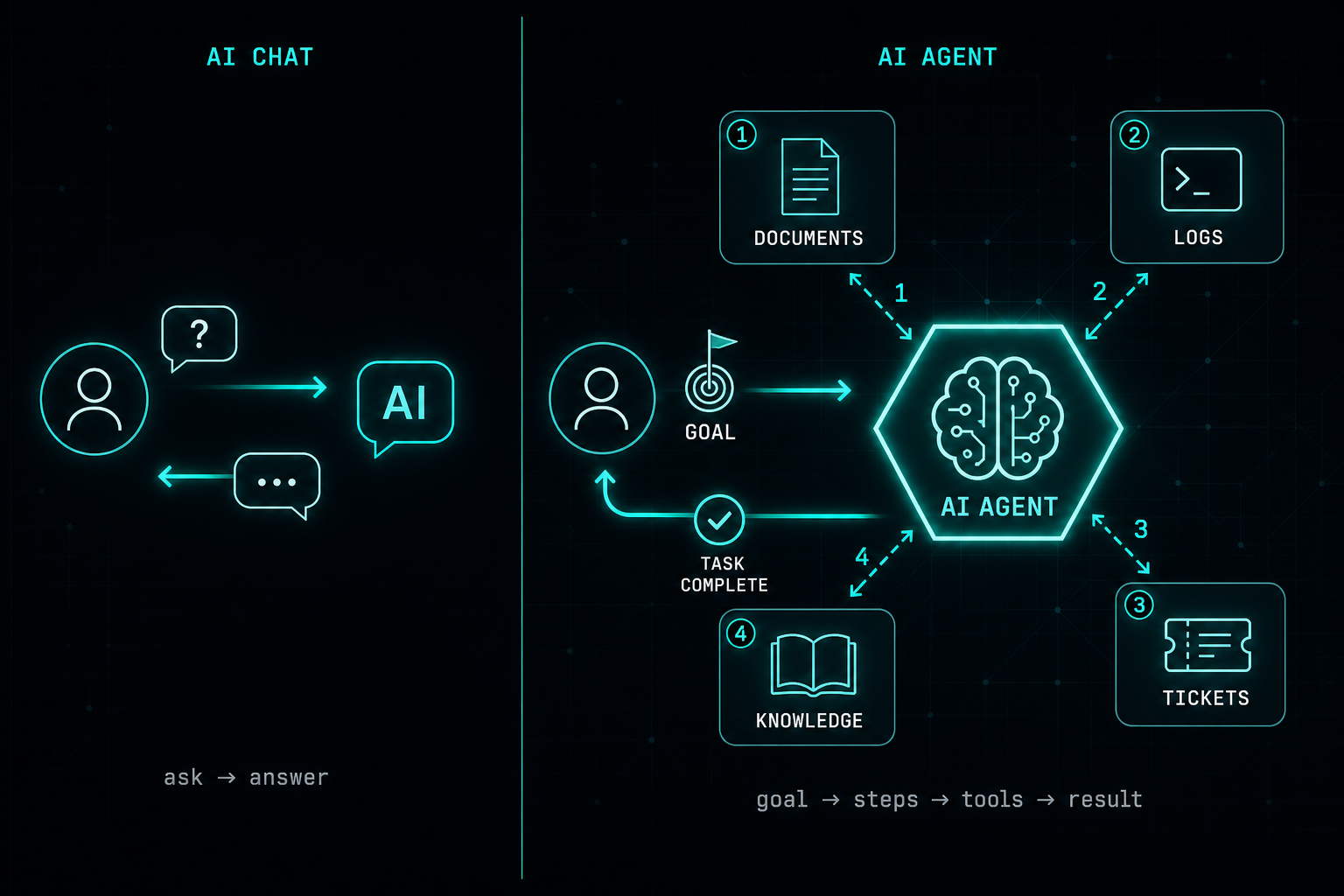
Split diagram contrasting a simple AI chat that answers a single question with an AI agent that takes a goal, executes step by step, and uses documents, logs, tickets, and internal knowledge to complete the task.
AI Infrastructure·

AI Agents: More Than Just a Chat

AI chat is where many companies start. AI agents are where AI becomes part of real work, reading documents, checking logs, searching tickets, and helping teams complete tasks instead of just talking about them.
2 min readRead article
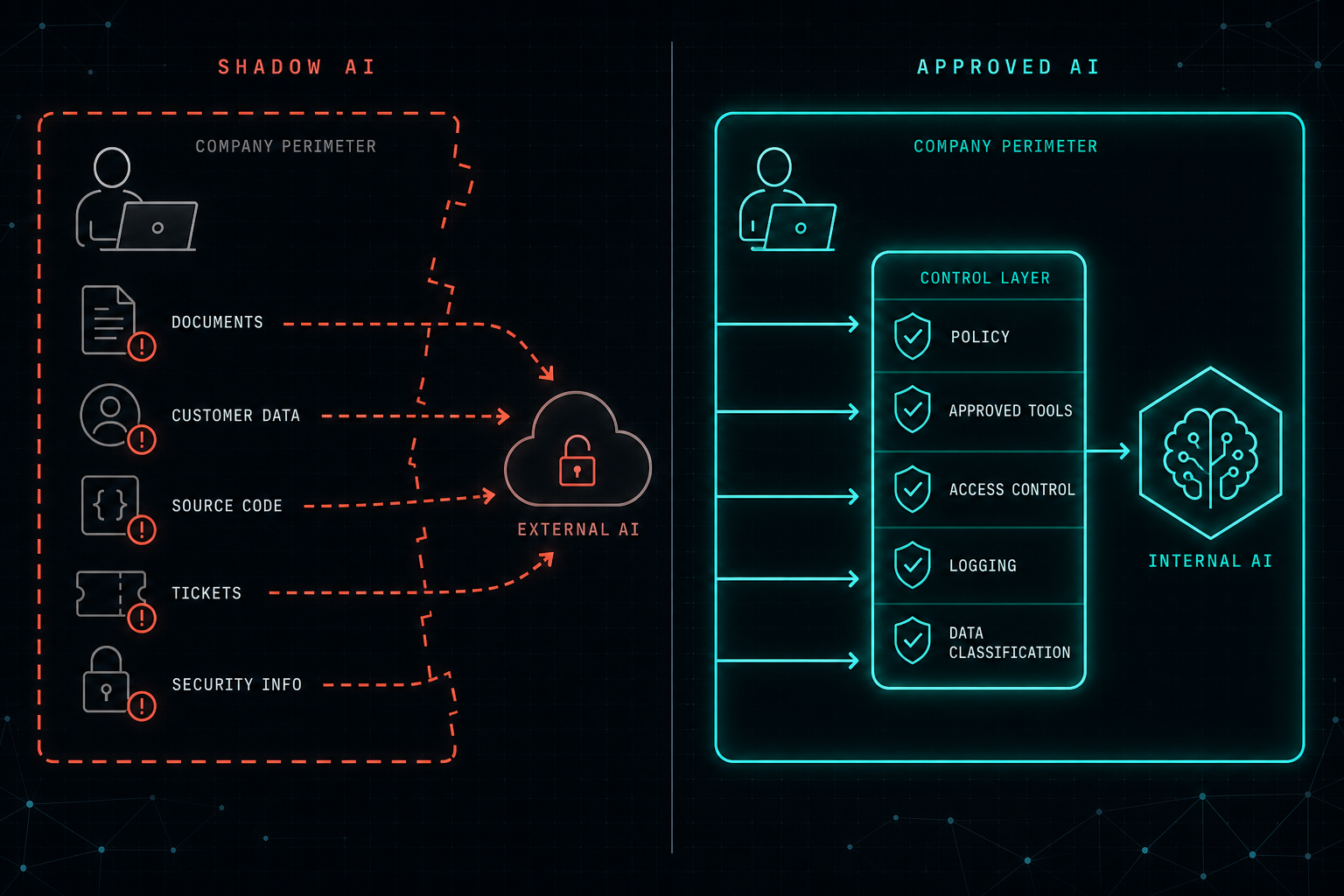
Split diagram contrasting Shadow AI, where sensitive company data leaks through a broken perimeter to an external AI, with an Approved AI model where data flows through policy, approved tools, access control, logging, and data classification controls into an internal AI.
AI Security·

Shadow AI: The New Risk Inside Organizations

Employees are already using AI at work. When IT does not know which tools, what data, or where the conversation history lives, that is Shadow AI. The fix is to give people a safe, approved path, not to block the only tool that gets the job done.
2 min readRead article
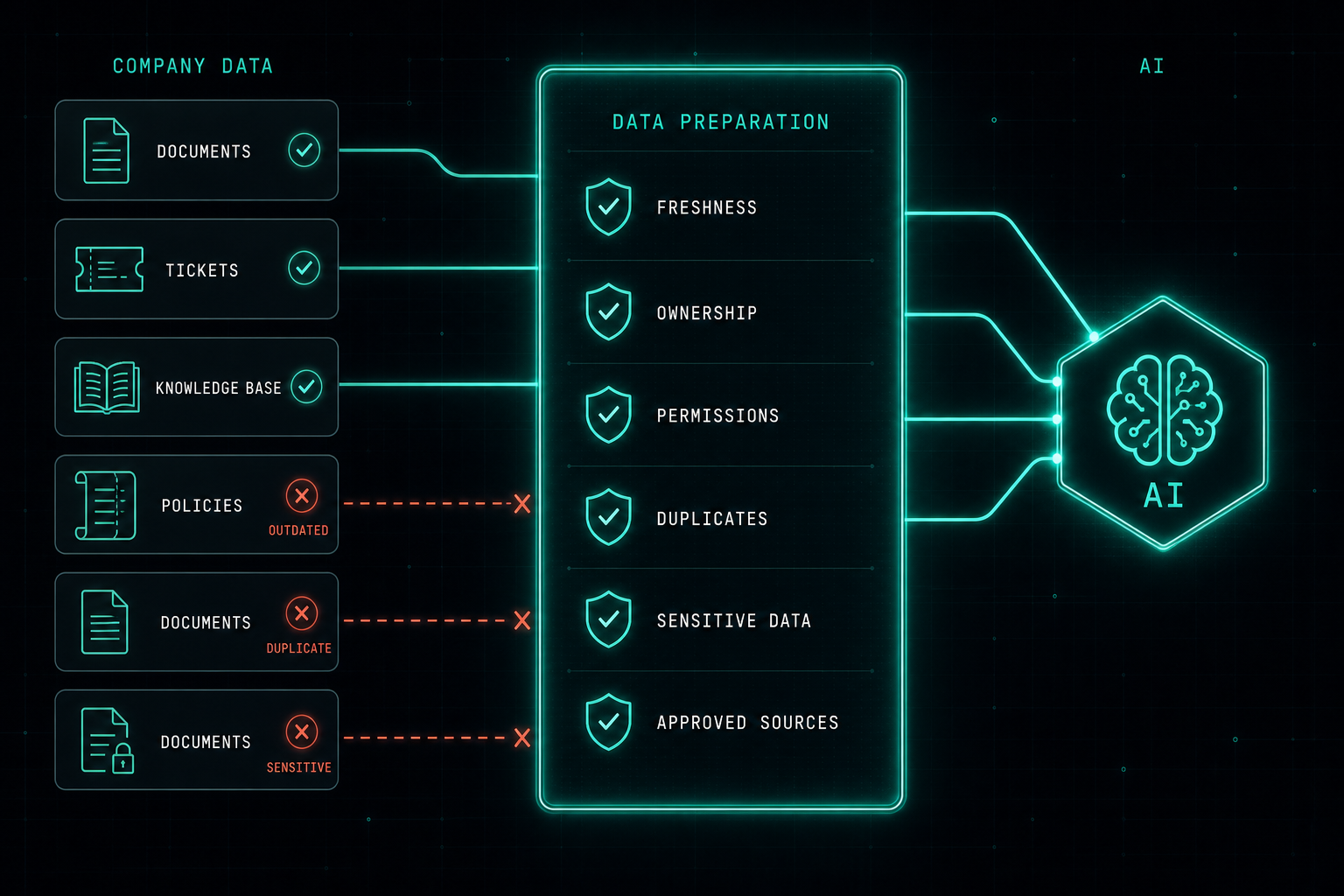
Diagram of a RAG data preparation workflow showing company documents, tickets, and knowledge bases passing through freshness, ownership, permissions, duplicates, sensitive data, and approved-source checks before reaching an AI system, while outdated, duplicate, and sensitive documents are rejected.
AI Infrastructure·

RAG: Good Answers Start With Good Data

RAG lets AI search company data before answering, but if that data is messy, outdated, or wide open, the AI will return confident wrong answers. Good RAG starts with good data, clear ownership, and the right security model.
2 min readRead article
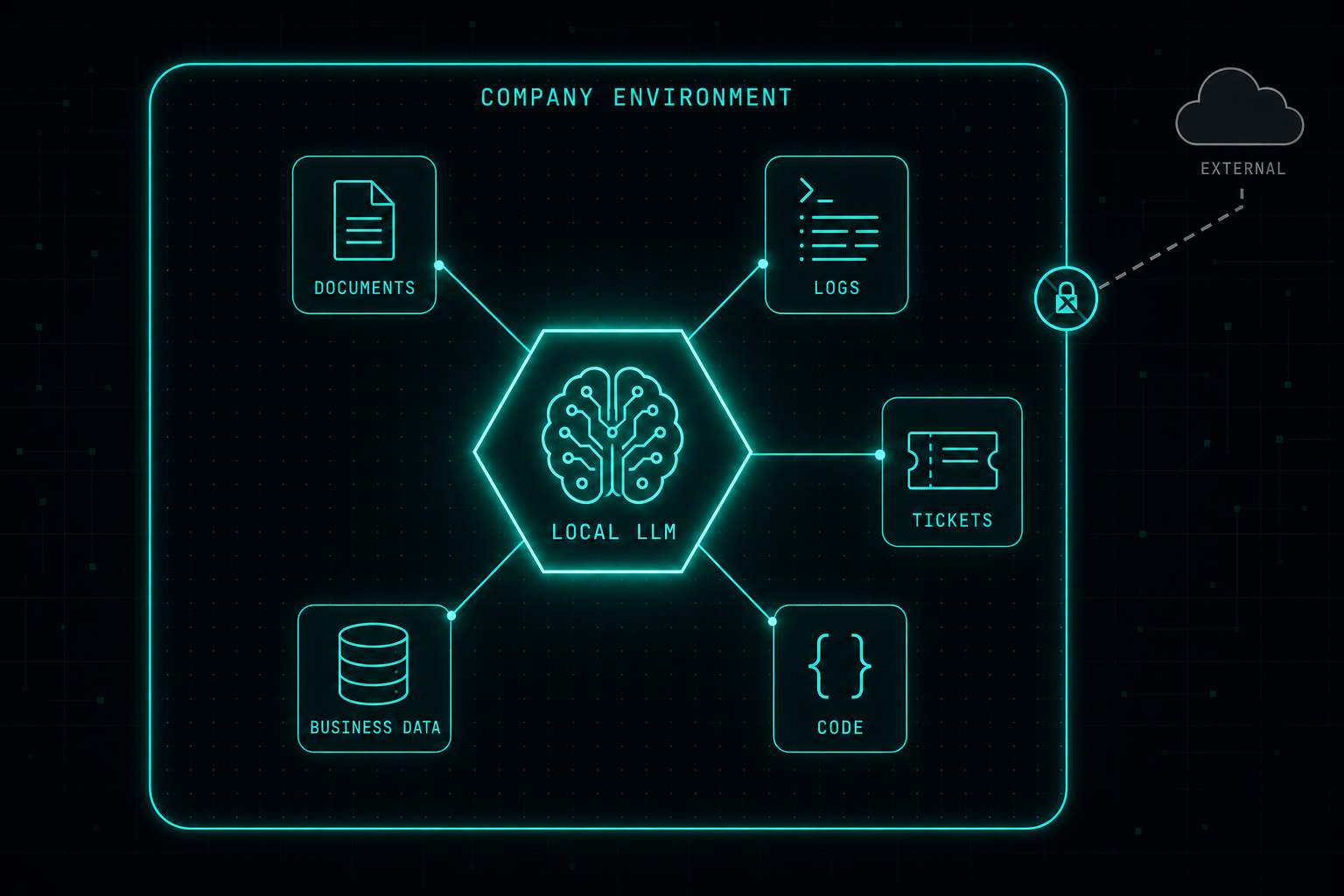
Diagram of a local LLM running inside a company environment, connected to internal documents, logs, tickets, code, and business data, with external access blocked at the perimeter.
AI Infrastructure·

Local LLM: Why It Is Worth the Time and Resources

Cloud AI is easy, but it is not always the right answer when the data needs to stay inside the company. A local LLM gives IT and security teams a way to use AI on internal systems without handing sensitive data to an external service.
2 min readRead article
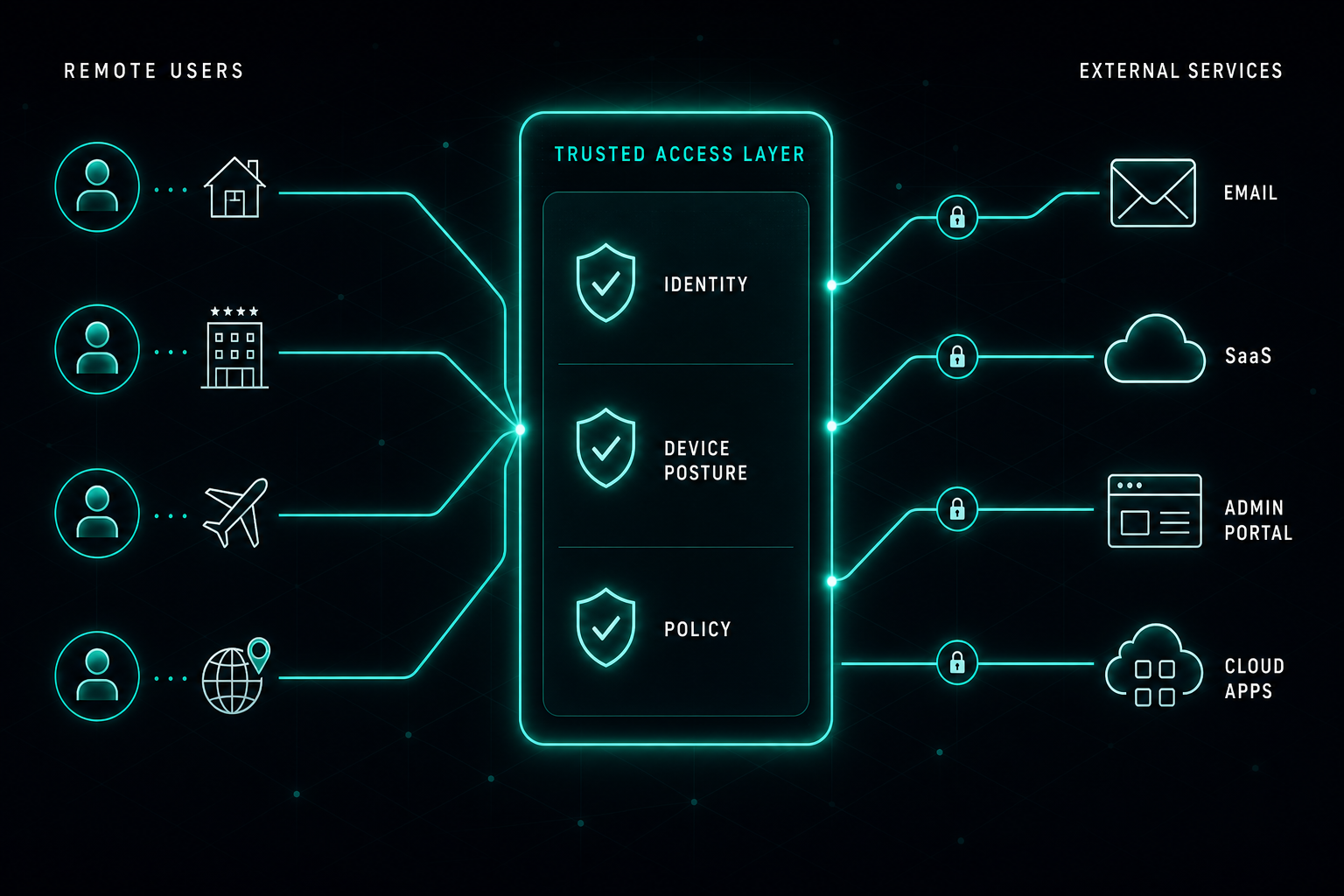
ZTNA diagram showing remote users in different locations reaching external cloud services through a trusted access layer that checks identity, device posture, and policy.
Access Security·

ZTNA: A Better Way to Secure External Access

Forcing VPN for every cloud service is no longer the right model. ZTNA gives IT teams a cleaner way to secure email, SaaS, and admin portals with identity, device posture, and policy-controlled access paths.
2 min readRead article
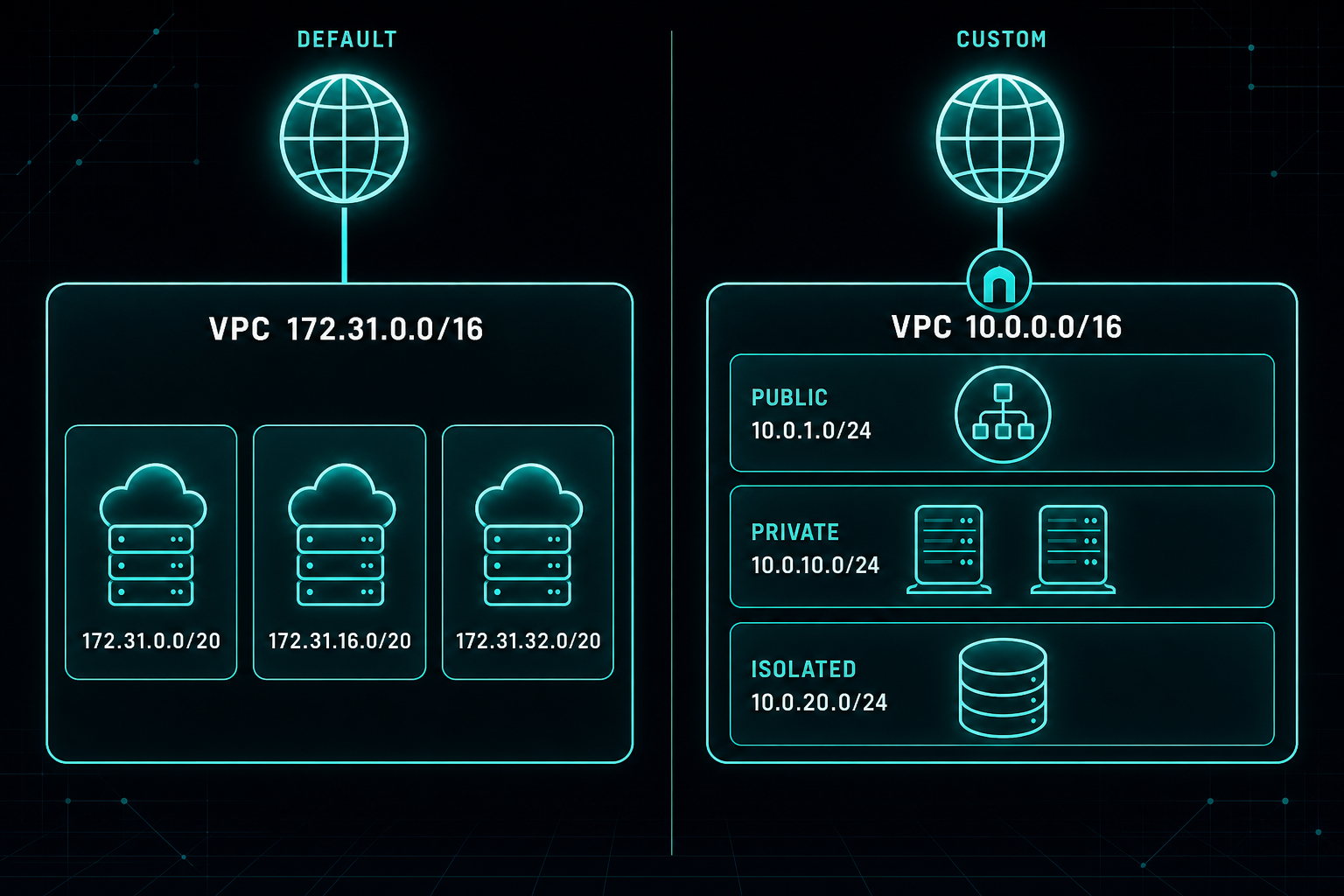
AWS network diagram contrasting the default 172.31.0.0/16 VPC with a custom 10.0.0.0/16 VPC split into public, private, and isolated subnets.
Cloud Architecture·

Why You Should Delete the Default AWS VPC

The default AWS VPC is fine for kicking the tires. For a real company environment, it is too open, too generic, and too easy to misuse.
2 min readRead article
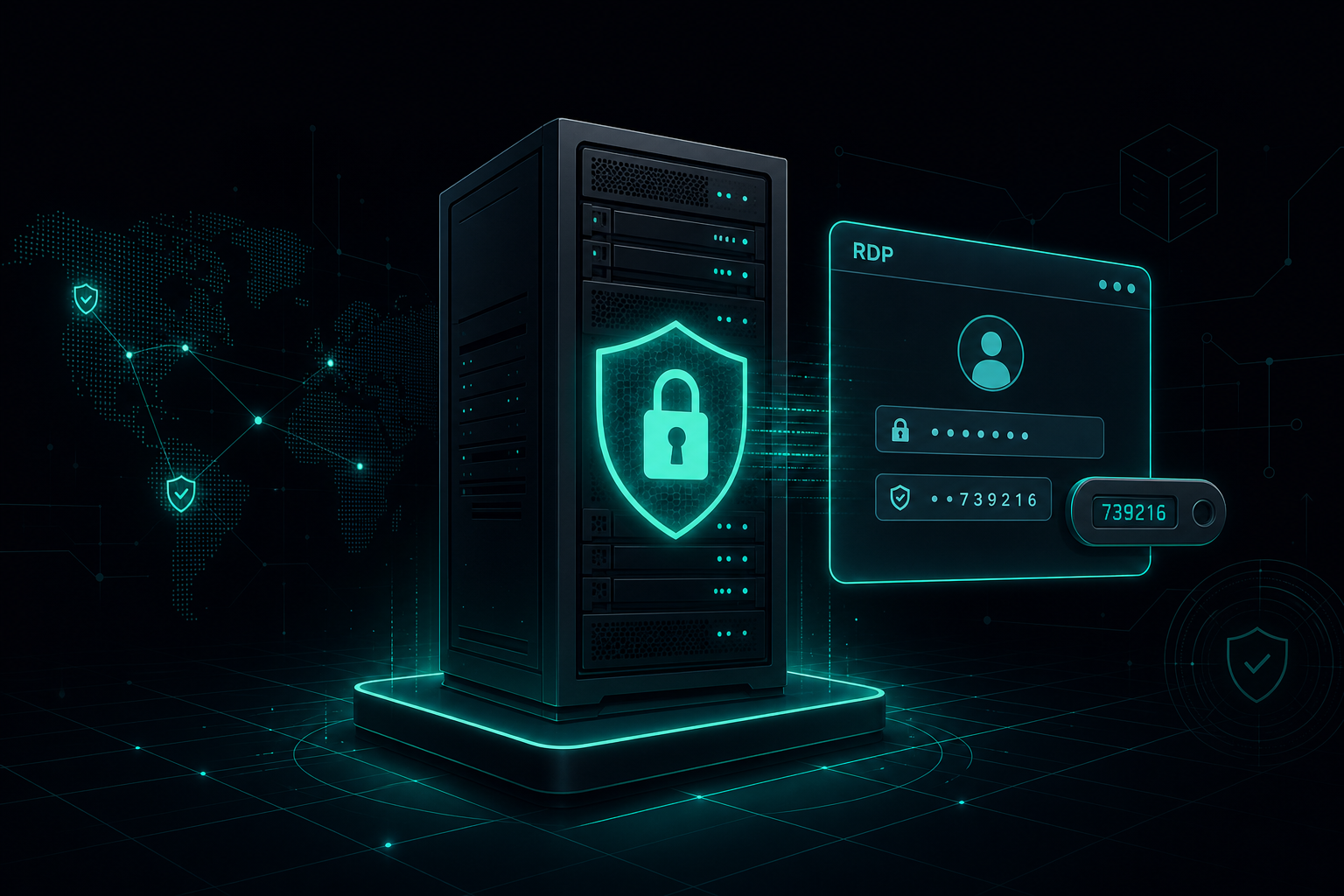
Windows server tower with a shield emblem and an RDP login window showing a Duo MFA code prompt.
Infrastructure Security·

Why Windows Servers Need MFA for RDP Access

MFA on email and VPN is standard. On Windows Server logins, it usually isn't. That gap is where most of the trouble starts.

3 min readRead article
// mcp server · connect your AI

Plug our knowledge into your AI

Our Insights catalog is a public Model Context Protocol server. Claude Desktop, Cursor, Continue, and any MCP-compatible client can connect and use our notes on IT infrastructure, security, AI, and cloud as a trusted source, with citations back to this site.

endpoint
{
  "mcpServers": {
    "myit-cyber-insights": {
      "url": "https://myitcyber.com/api/mcp"
    }
  }
}